> ## Documentation Index
> Fetch the complete documentation index at: https://docs.rxresu.me/llms.txt
> Use this file to discover all available pages before exploring further.
# Tell your story once
> Save facts and five-part stories you can reuse in applications and interviews, then correct or remove them when needed.
You should not have to rewrite your best project from scratch for every job. Save the experience in **Career → Knowledge**, then use it when drafting answers or preparing for interviews.
Start with one useful example. You do not need to write your entire career history first.
## Add a fact
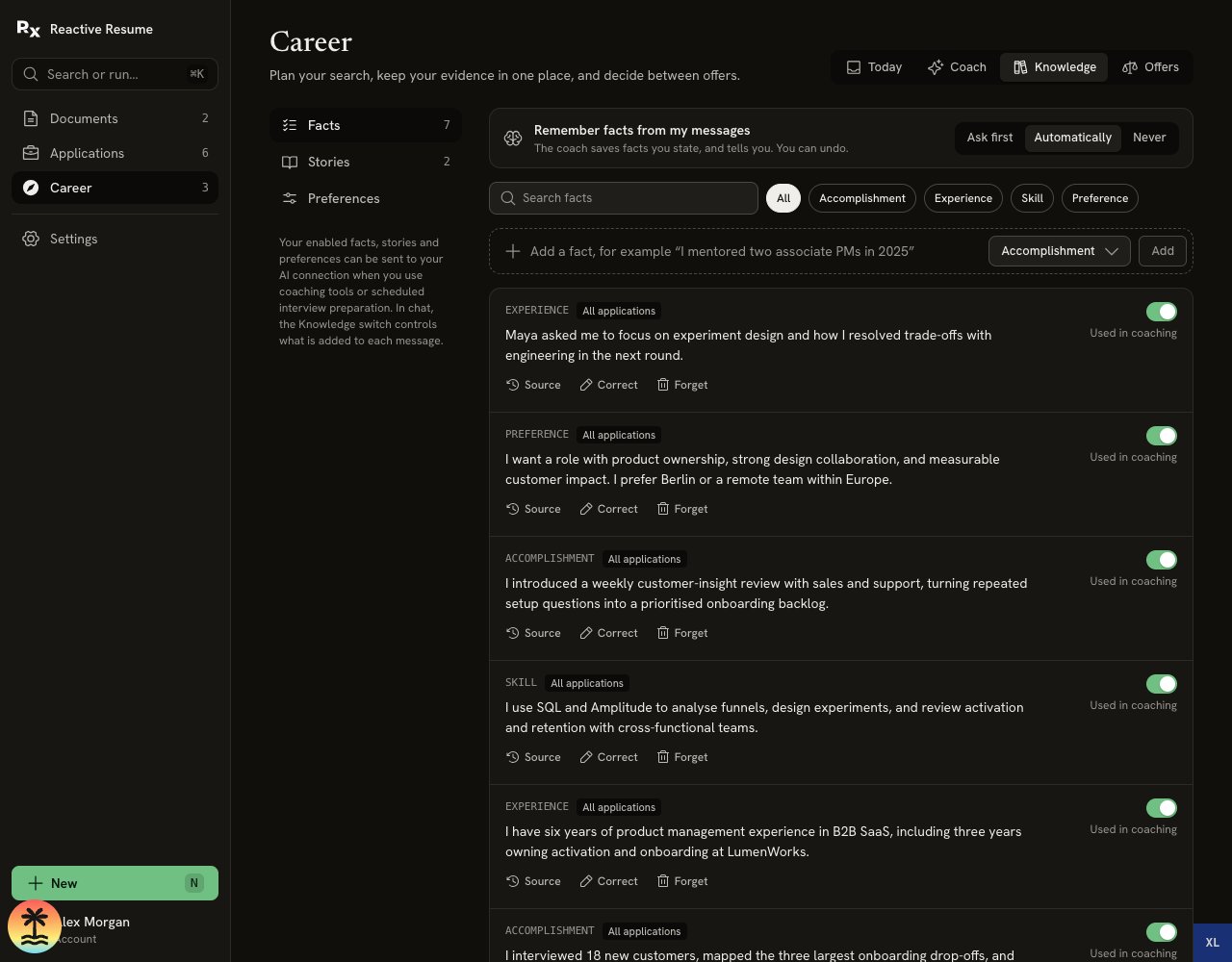
1. Open **Knowledge → Facts**.
2. Write a concrete statement in the fact input. Include your contribution and a measured result only when you know it.
3. Choose **Accomplishment**, **Experience**, **Skill** or **Preference**.
4. Select **Add**.
A useful fact names what you did: “I created a weekly review with sales and support to turn recurring customer questions into a prioritized backlog.” It is more useful than “I am a strong collaborator.”
Use **Source** on a fact to see where it came from. Facts you add yourself are your statements; the app does not independently verify them.
## Write a five-part story
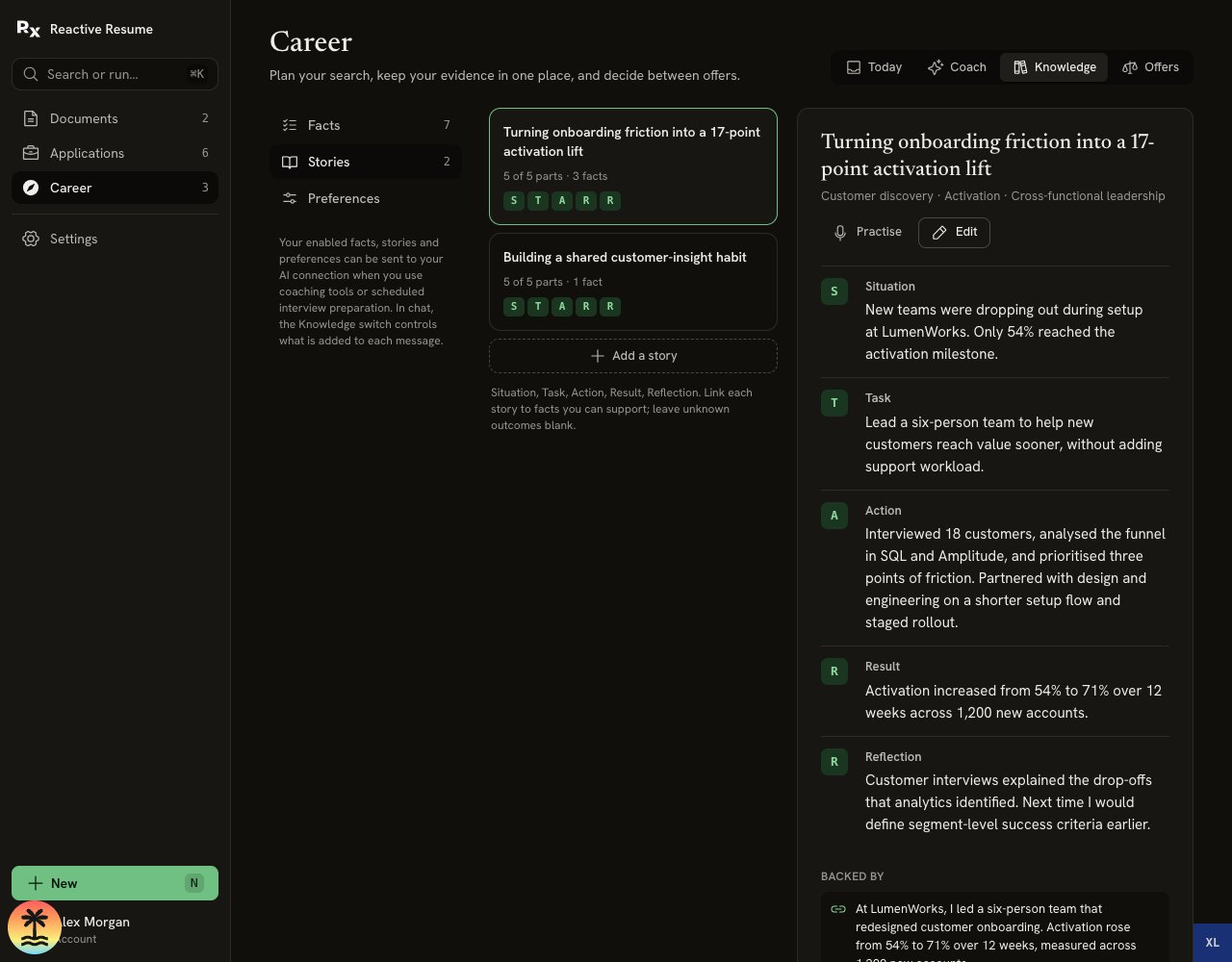
Open **Knowledge → Stories → Add a story**. Give the story a clear title, add optional tags, and fill in the five parts.
| Part | Answer this question | Example from a fictional project |
| - | - | - |
| **Situation** | What was happening before you started? | New customers were abandoning setup. |
| **Task** | What were you responsible for? | Help more customers finish setup without adding support work. |
| **Action** | What did you personally do? | Interviewed customers, reviewed the funnel and worked with design on a shorter flow. |
| **Result** | What changed, and how do you know? | A measured improvement, if you have the records to support it. |
| **Reflection** | What did you learn? | Define success measures before starting the next rollout. |
Situation, Task and Action are required. Leave Result blank if you cannot support the outcome. A story can still be useful without a number. Reflection can also stay blank until you have something useful to add.
Under **Backed by**, select the facts that support the story. Then select **Save story**.
 ## Reuse the story
* In **Apply**, add a form question and choose **Draft** to draw on relevant Knowledge.
* In **Prepare**, open the stories suggested for the interview, or draft one that is missing.
* In **Practise**, rehearse a question using your story, then review feedback.
* In **Coach**, keep **Knowledge** on when you want those facts and stories included with your message.
Each use has a different audience. Review the wording rather than pasting the whole story into every answer. [Write an application answer](/guides/writing-application-answers) or [rehearse for an interview](/guides/preparing-for-interview-day#practise-one-answer).
## Choose what the coach remembers
At the top of **Facts**, **Remember facts from my messages** offers three choices:
| Setting | What happens |
| - | - |
| **Ask first** | The default. A proposal appears below a coach answer; select **Remember** to save it. |
| **Automatically** | Facts you state can be saved, with a notice and **Undo**. |
| **Never** | Facts are not saved from coach messages. |
Practice answers are not remembered as career facts. You can still add a real accomplishment manually when you are ready to stand behind it.
## Reuse the story
* In **Apply**, add a form question and choose **Draft** to draw on relevant Knowledge.
* In **Prepare**, open the stories suggested for the interview, or draft one that is missing.
* In **Practise**, rehearse a question using your story, then review feedback.
* In **Coach**, keep **Knowledge** on when you want those facts and stories included with your message.
Each use has a different audience. Review the wording rather than pasting the whole story into every answer. [Write an application answer](/guides/writing-application-answers) or [rehearse for an interview](/guides/preparing-for-interview-day#practise-one-answer).
## Choose what the coach remembers
At the top of **Facts**, **Remember facts from my messages** offers three choices:
| Setting | What happens |
| - | - |
| **Ask first** | The default. A proposal appears below a coach answer; select **Remember** to save it. |
| **Automatically** | Facts you state can be saved, with a notice and **Undo**. |
| **Never** | Facts are not saved from coach messages. |
Practice answers are not remembered as career facts. You can still add a real accomplishment manually when you are ready to stand behind it.
 ## Correct an old fact
Select **Correct** on the fact, update the text and save it. Its earlier text remains in correction history. Stories linked to that fact are flagged when the correction is newer than the story.
Open each flagged story, check the affected claims, edit them and save the story again. Review older drafts too; correcting Knowledge does not rewrite documents or messages you already sent.
A flagged story is excluded from new coaching until you review and save it. Unfinished story text stays in this browser tab when you navigate or refresh. **Practise** opens the selected story with a relevant application; a missing story link shows an error instead of opening another story.
## Keep a detail for one job
Application notes belong to that application. A debrief can also suggest remembering a detail **for that company only**, such as what an interviewer asked you to explain next time.
Facts show their scope. Choose **Use for all applications** only when a private fact is useful beyond that job. This changes its scope, not its truth.
## Stop using or forget a fact
Switch **Used in coaching** off to keep the fact in your account while excluding it from new coaching context. A switched-off fact cannot support a story sent to the coach.
Select **Forget** to remove the fact and its evidence links. Use **Undo** within the six-second notice if you change your mind. The original resume, file or message is not deleted, and copies already exported or sent to a provider remain outside this action. See [Your data](/guides/career-workspace-reference#your-data).
Linked story text remains yours, but its supporting links are cleared and the story stops being shared with AI. Review it and deliberately reconnect suitable facts before using it again. AI work already running with changed or forgotten Knowledge is discarded instead of publishing that obsolete result.
After you correct, switch off or forget a fact, older interview debriefs remain in **Saved** but are left out of the coach's interview history. New debriefs can use your updated Knowledge.
This documentation is built and hosted on [Mintlify](https://mintlify.com), a developer documentation platform.
## Correct an old fact
Select **Correct** on the fact, update the text and save it. Its earlier text remains in correction history. Stories linked to that fact are flagged when the correction is newer than the story.
Open each flagged story, check the affected claims, edit them and save the story again. Review older drafts too; correcting Knowledge does not rewrite documents or messages you already sent.
A flagged story is excluded from new coaching until you review and save it. Unfinished story text stays in this browser tab when you navigate or refresh. **Practise** opens the selected story with a relevant application; a missing story link shows an error instead of opening another story.
## Keep a detail for one job
Application notes belong to that application. A debrief can also suggest remembering a detail **for that company only**, such as what an interviewer asked you to explain next time.
Facts show their scope. Choose **Use for all applications** only when a private fact is useful beyond that job. This changes its scope, not its truth.
## Stop using or forget a fact
Switch **Used in coaching** off to keep the fact in your account while excluding it from new coaching context. A switched-off fact cannot support a story sent to the coach.
Select **Forget** to remove the fact and its evidence links. Use **Undo** within the six-second notice if you change your mind. The original resume, file or message is not deleted, and copies already exported or sent to a provider remain outside this action. See [Your data](/guides/career-workspace-reference#your-data).
Linked story text remains yours, but its supporting links are cleared and the story stops being shared with AI. Review it and deliberately reconnect suitable facts before using it again. AI work already running with changed or forgotten Knowledge is discarded instead of publishing that obsolete result.
After you correct, switch off or forget a fact, older interview debriefs remain in **Saved** but are left out of the coach's interview history. New debriefs can use your updated Knowledge.
This documentation is built and hosted on [Mintlify](https://mintlify.com), a developer documentation platform.