> ## Documentation Index
> Fetch the complete documentation index at: https://docs.rxresu.me/llms.txt
> Use this file to discover all available pages before exploring further.
# Your career, in one place
> Keep your experience, applications and interview preparation together, with evidence you can check and AI you choose.
You have an interview this afternoon, another application form to finish, and a recruiter waiting for a reply. Career helps you carry the same experience through all three, without starting over each time.
Start with facts you know are true and stories about work you have done. Use them across your search, then keep each job's posting, answers, interview preparation and messages in its own workspace.
## Two places, two purposes
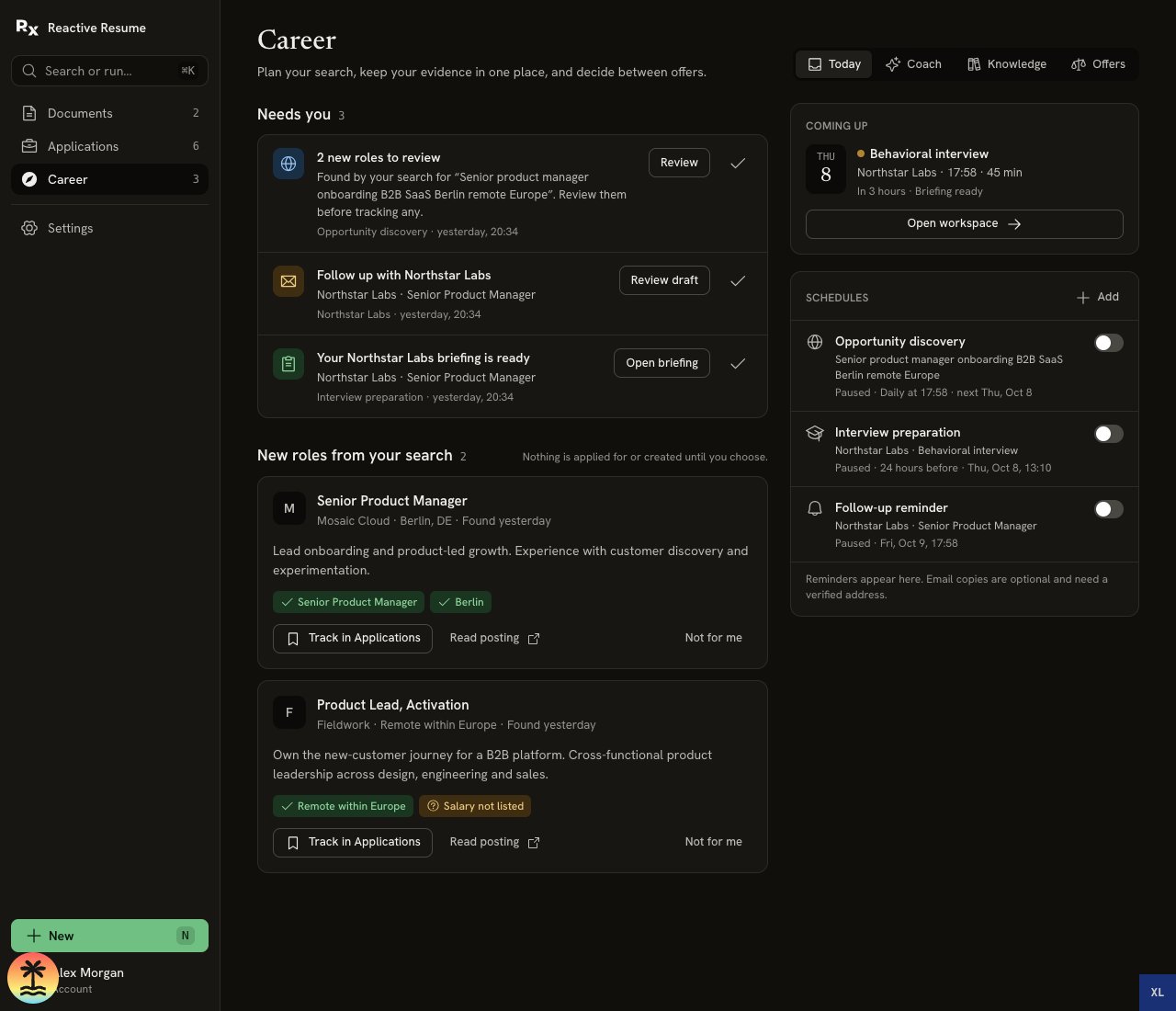
**Career** in the sidebar is for your whole search:
* **Today** brings together reminders, new roles and your next interview.
* **Coach** is a conversation about your search across jobs.
* **Knowledge** holds your facts, stories and preferences.
* **Offers** compares saved offers side by side.
**Applications** is your job tracker. Open an application and select **Open workspace** for tools dedicated to that job: **Fit**, **Apply**, **Prepare**, **Practise**, **Debrief**, **Messages** and **Saved**. **Ask the coach** opens a conversation beside the tab you are using, with that application's context.
 ## Keep your experience honest
A **fact** is something you state or confirm, such as what you did, when you did it, or a result you measured. A **story** puts that experience into five parts: Situation, Task, Action, Result and Reflection. Link stories to the facts that support them.
These are your records, not independent checks by an employer or a background-check service. You decide whether each fact is accurate. Leave a story's Result blank when you cannot support it. If you correct a linked fact later, the story is flagged for review.
**Fit** shows the evidence behind each requirement. **No evidence yet** means your Knowledge does not show it; it does not mean you cannot do the job. A related experience can be useful without becoming a claim that you have done something you have not.
AI drafts are built from the experience you supply. Read them before using them, especially names, dates, your personal contribution and results. [Build your Knowledge](/guides/building-career-knowledge), or [check a role when your experience is different](/guides/checking-job-fit).
## Tell it once, use it again
The same shared fact or story can help with an application answer, an interview opening, a practice answer or a recruiter reply. You still review each draft for its audience.
Job-specific notes stay with that application. A fact marked private to one application stays in that scope until you choose **Use for all applications**. Shared Knowledge lets you reuse experience without treating every conversation with an employer as a fact about every job.
## Let scheduled work help
Enable schedules when you want discovery searches, interview briefings or follow-up reminders to run while your browser is closed. Results wait in **Today** for you to review. Finding a role does not apply for it; reading a message does not send a reply.
Schedules need a working installation and the relevant connections. Discovery checks that new results are individual open postings when it reads them. A posting can close afterward, and a search may find few or no new roles. [Set up a quiet search](/guides/finding-roles-automatically) or [prepare for interview day](/guides/preparing-for-interview-day).
## Choose your AI and control your data
Reactive Resume is free and open source. You can use your own AI connection, including OpenAI, DeepSeek, Google Gemini or another supported provider, and choose a default. Provider usage can cost money; it is billed through the connection you use. [Connect an AI provider](/guides/using-ai).
Each AI action has a line explaining what it sends and which connection receives it. In the coach, context controls let you choose what accompanies the next message. Knowledge editing and the offer comparison itself do not send an AI request. Previously sent information remains subject to your provider's policies.
You can correct facts, switch them off for coaching, forget them, and export your account data. You can also [self-host Reactive Resume](/self-hosting/docker). See [controls and data reference](/guides/career-workspace-reference#your-data) for the different effects of these actions.
## Start with the task in front of you
| If you are thinking… | Start here |
| - | - |
| “I have a job to apply for.” | [Prepare your first application](/guides/first-career-application) |
| “I keep rewriting the same project.” | [Write application answers](/guides/writing-application-answers) |
| “My interview is today and my mind is blank.” | [Get ready for interview day](/guides/preparing-for-interview-day) |
| “I cannot scroll job boards all day.” | [Find roles while you are busy](/guides/finding-roles-automatically) |
| “What should I say to this recruiter?” | [Reply to a recruiter](/guides/replying-to-recruiters) |
| “Which offer fits my life?” | [Compare two offers](/guides/comparing-job-offers) |
This documentation is built and hosted on [Mintlify](https://mintlify.com), a developer documentation platform.
## Keep your experience honest
A **fact** is something you state or confirm, such as what you did, when you did it, or a result you measured. A **story** puts that experience into five parts: Situation, Task, Action, Result and Reflection. Link stories to the facts that support them.
These are your records, not independent checks by an employer or a background-check service. You decide whether each fact is accurate. Leave a story's Result blank when you cannot support it. If you correct a linked fact later, the story is flagged for review.
**Fit** shows the evidence behind each requirement. **No evidence yet** means your Knowledge does not show it; it does not mean you cannot do the job. A related experience can be useful without becoming a claim that you have done something you have not.
AI drafts are built from the experience you supply. Read them before using them, especially names, dates, your personal contribution and results. [Build your Knowledge](/guides/building-career-knowledge), or [check a role when your experience is different](/guides/checking-job-fit).
## Tell it once, use it again
The same shared fact or story can help with an application answer, an interview opening, a practice answer or a recruiter reply. You still review each draft for its audience.
Job-specific notes stay with that application. A fact marked private to one application stays in that scope until you choose **Use for all applications**. Shared Knowledge lets you reuse experience without treating every conversation with an employer as a fact about every job.
## Let scheduled work help
Enable schedules when you want discovery searches, interview briefings or follow-up reminders to run while your browser is closed. Results wait in **Today** for you to review. Finding a role does not apply for it; reading a message does not send a reply.
Schedules need a working installation and the relevant connections. Discovery checks that new results are individual open postings when it reads them. A posting can close afterward, and a search may find few or no new roles. [Set up a quiet search](/guides/finding-roles-automatically) or [prepare for interview day](/guides/preparing-for-interview-day).
## Choose your AI and control your data
Reactive Resume is free and open source. You can use your own AI connection, including OpenAI, DeepSeek, Google Gemini or another supported provider, and choose a default. Provider usage can cost money; it is billed through the connection you use. [Connect an AI provider](/guides/using-ai).
Each AI action has a line explaining what it sends and which connection receives it. In the coach, context controls let you choose what accompanies the next message. Knowledge editing and the offer comparison itself do not send an AI request. Previously sent information remains subject to your provider's policies.
You can correct facts, switch them off for coaching, forget them, and export your account data. You can also [self-host Reactive Resume](/self-hosting/docker). See [controls and data reference](/guides/career-workspace-reference#your-data) for the different effects of these actions.
## Start with the task in front of you
| If you are thinking… | Start here |
| - | - |
| “I have a job to apply for.” | [Prepare your first application](/guides/first-career-application) |
| “I keep rewriting the same project.” | [Write application answers](/guides/writing-application-answers) |
| “My interview is today and my mind is blank.” | [Get ready for interview day](/guides/preparing-for-interview-day) |
| “I cannot scroll job boards all day.” | [Find roles while you are busy](/guides/finding-roles-automatically) |
| “What should I say to this recruiter?” | [Reply to a recruiter](/guides/replying-to-recruiters) |
| “Which offer fits my life?” | [Compare two offers](/guides/comparing-job-offers) |
This documentation is built and hosted on [Mintlify](https://mintlify.com), a developer documentation platform.