> ## Documentation Index
> Fetch the complete documentation index at: https://docs.rxresu.me/llms.txt
> Use this file to discover all available pages before exploring further.
# Career and workspace controls
> A reference for tabs, saved versions, context, schedules, voice limits and career data controls.
Use this page to look up a control or limit. For a guided start, see [Prepare your first application](/guides/first-career-application).
## Where things live
| Place | Purpose |
| - | - |
| **Career → Today** | Notifications, discovered roles, your next interview and schedules. |
| **Career → Coach** | Conversations across your search. |
| **Career → Knowledge → Facts** | Statements about your experience, sources, corrections and coaching controls. |
| **Career → Knowledge → Stories** | Situation, Task, Action, Result and Reflection with supporting facts. |
| **Career → Knowledge → Preferences** | Target roles, places, salary and work preferences. |
| **Career → Offers** | Two saved offer versions and unanswered questions. |
| **Applications → application details → Open workspace** | Work on one job. |
| **Settings → AI & developer** | AI connections, default provider and web access. |
| **Settings → Preferences** | Account timezone and display preferences. |
## Application workspace tabs
| Tab | Main action | What stays with the job |
| - | - | - |
| **Fit** | **Check fit** | Requirements, their origin, supporting evidence and preference checks. |
| **Apply** | **Draft**, **Tighten**, **Mark as applied** | Editable form answers, backing facts, checklist and submitted answer snapshots. |
| **Prepare** | **Plan my preparation** | Timed plan, short briefing, stories and questions for an interview. |
| **Practise** | **Hear it**, **Get feedback** | Typed or spoken attempts and feedback. |
| **Debrief** | **Review my answer** | A recalled real interview answer, observations and practice priorities. |
| **Messages** | **Read it for me** | Employer message, suggested reply and reviewable application changes. |
| **Saved** | **Open in…** | Earlier generated material and saved offer or answer versions. |
The initial tab follows the application's stage and interview timing. Select any tab to work elsewhere. The context column shows the next step, people, documents and notes for the job.
## Saved versions
Generated fit checks, briefings, practice feedback, debriefs and message reviews are saved. Drafted or tightened form answers first need **Accept**; answers are copied into Saved when recorded through **Apply → Mark as applied**.
**Saved** lists items newest first and offers filters by type. Removing the last item in a selected type returns the list to All. **Open in…** opens an earlier version read-only in its tab; **Back to current** returns to current work. Offer items open in Career → Offers.
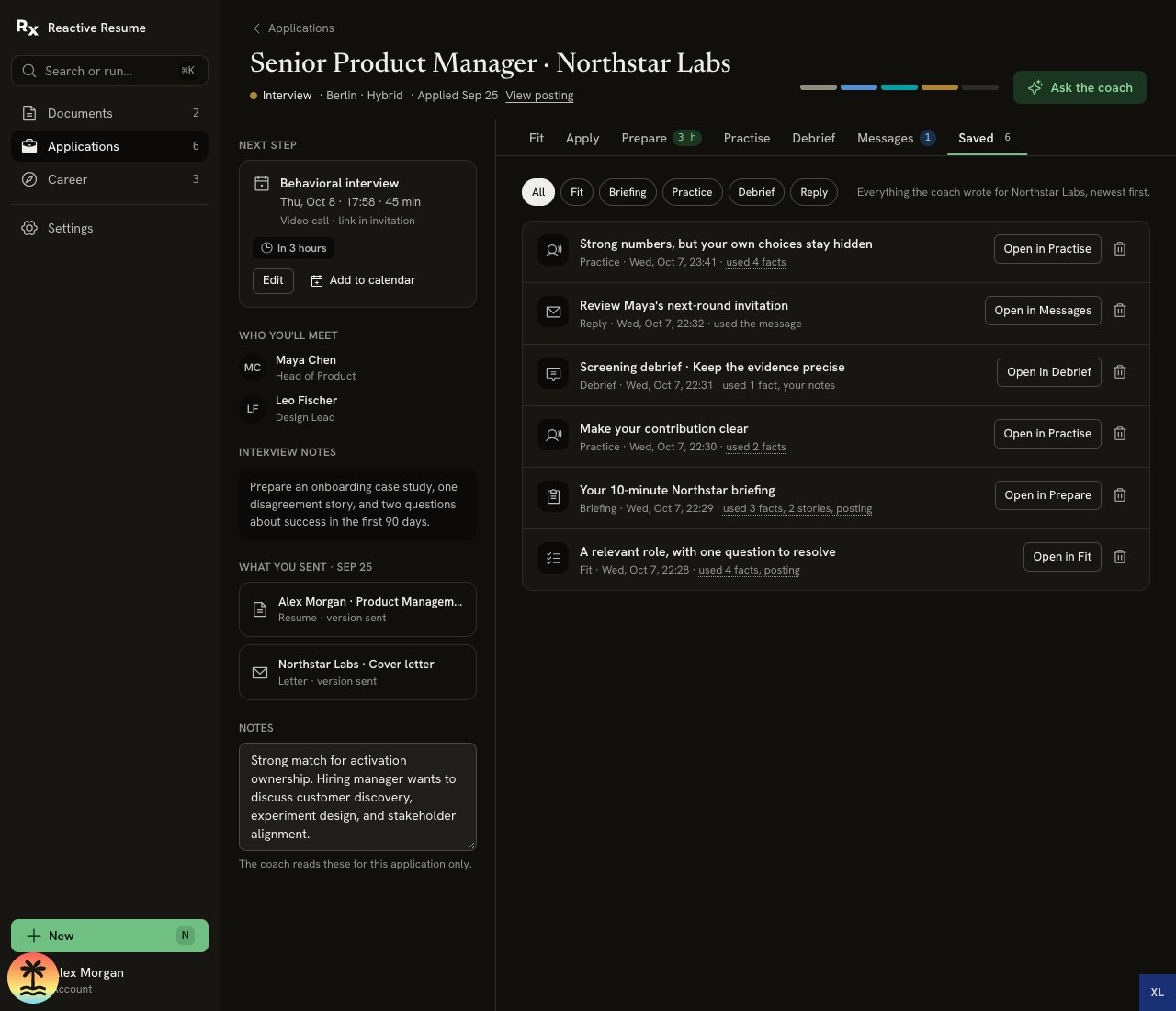 Changes to Knowledge, the posting or documents can make an old result out of date. An old version records what was produced then; it is not automatically rewritten.
Sent resume and letter versions are document snapshots shown under **What you sent**. They are separate from the latest editable document and remain accessible while that document is in Trash. See [Managing an application](/guides/managing-an-application#seeing-what-you-sent).
## Coach context and AI actions
**Ask the coach** opens application coaching beside a workspace tab. The coach receives the job and tab context selected for that conversation. You can start another conversation or reopen one from its history.
In Career → Coach, context controls include:
| Control | What it includes when on |
| - | - |
| **Applications** | Summaries of your applications. |
| **Knowledge** | Active facts, eligible stories and career preferences. |
| **Web research** | Access to public research through the selected web service; off by default. Search terms go to that service. |
Changes to Knowledge, the posting or documents can make an old result out of date. An old version records what was produced then; it is not automatically rewritten.
Sent resume and letter versions are document snapshots shown under **What you sent**. They are separate from the latest editable document and remain accessible while that document is in Trash. See [Managing an application](/guides/managing-an-application#seeing-what-you-sent).
## Coach context and AI actions
**Ask the coach** opens application coaching beside a workspace tab. The coach receives the job and tab context selected for that conversation. You can start another conversation or reopen one from its history.
In Career → Coach, context controls include:
| Control | What it includes when on |
| - | - |
| **Applications** | Summaries of your applications. |
| **Knowledge** | Active facts, eligible stories and career preferences. |
| **Web research** | Access to public research through the selected web service; off by default. Search terms go to that service. |
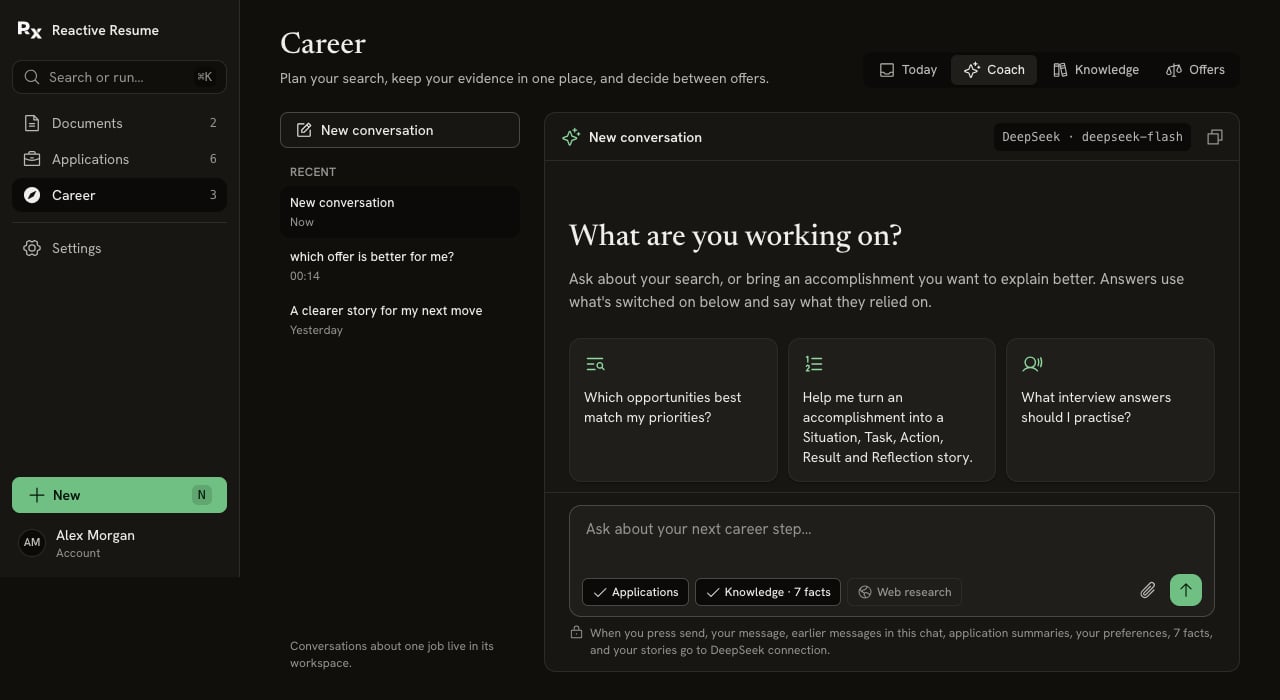 Choices persist for that conversation. Earlier messages in the same chat can already contain information shared before a control was turned off.
Workspace buttons such as **Check fit** and **Read it for me** are separate AI actions. Their privacy lines describe their own inputs; chat context choices do not turn those inputs off. They use the default usable AI connection. A schedule can specify a connection; if it is no longer usable, it falls back to the default. [Provider selection](/guides/using-ai#which-provider-is-used) explains this further.
## Schedules
| Kind | Settings | Result |
| - | - | - |
| **Find roles** | Search, first run, local time; every day, every 3 days or every week. | New checked postings wait in Today. |
| **Prepare** | Interview, AI connection; 24 hours before, 2 hours before or Morning of. | Saved briefing and a Today notification. |
| **Remind me** | Application, date and local time. | A one-time reminder in Today. |
Schedules use the account timezone from **Settings → Preferences**. Morning of means 08:00 on the interview day, or two hours before interviews starting before 10:00. Saving a preparation schedule whose run time has passed makes it due now.
The schedule switch pauses work while keeping settings. Editing the interview moves its briefing schedule. Removing an interview pauses related preparation schedules and produces a notice. Recurring searches keep their local time across daylight-saving changes; missed runs are coalesced rather than all replayed.
Interview and schedule forms reject local times skipped by a daylight-saving change. Choose a valid time in the selected timezone instead of accepting an automatic one-hour shift.
Delivery depends on server scheduling and connections. The browser can be closed. **Also email…**, when offered, requires a verified account email and email delivery configured by the administrator. Email copies are optional; in-app notices remain in Today.
Self-hosters: see [Career scheduling operations](/contributing/career-platform#operate-scheduled-work). Node/Docker uses a server timer; Vercel and Cloudflare use their native schedulers. Installation limits can delay due work.
## Voice
Text feedback uses your selected text AI connection. Reading questions and transcribing answers are separate tasks chosen in **Voice settings**.
| Item | Limit or behavior |
| - | - |
| Recording | Up to two minutes per answer. |
| Audio upload | Nonempty WebM, MP4/M4A, MP3, WAV or Ogg, at most 2 MiB; the interface says 2 MB. |
| Read aloud | A supported speech connection, otherwise the browser's voice where available. Sends the question text. |
| Transcription | A supported transcription connection, otherwise browser dictation where available. |
| Browser dictation | Available in supported Chrome, Edge and Safari environments; not Firefox. Permission and platform support still matter. |
| Fallback | **Type** remains available when recording or dictation does not work. |
| Transcript | Check and edit before requesting feedback. Provider transcripts keep original and edited text distinguishable. |
| Raw recording | Not stored by the Reactive Resume server. Provider processing follows that provider's policies. |
| Local audio | Cleared after successful provider transcription unless you choose to keep it locally for download. A failed transcription keeps it for retry; local audio clears when the answer panel unmounts. |
Speech connections may charge separately from text AI. Browser speech does not use your AI-provider account; the browser maker may process audio for dictation. The page names who handles each action. See [Practise one answer](/guides/preparing-for-interview-day#practise-one-answer).
## Your data
| Action | Effect |
| - | - |
| **Correct** a fact | Keeps earlier text in history and flags linked stories for review. |
| Switch **Use in coaching** off | Keeps the fact but excludes it from new coaching context. |
| **Forget** a fact | Removes its content and evidence links after the Undo window. Leaves the source resume, message or file alone. |
| **Use for all applications** | Promotes an application-private fact to shared Knowledge. |
| Delete a Saved item | Removes that saved result after the Undo window; does not erase sent employer messages. |
| Export account data | Includes career preferences, facts and revisions, stories, saved items, workspace data, schedules, notifications, discovery, jobs, stored voice transcripts and career conversations. Provider credentials are excluded. |
| Delete account | Removes your dependent career records along with account data. See [Deleting your account](/guides/deleting-your-account). |
Undo notices for Career deletions and applied message changes last six seconds. Once committed, deletion is not an ongoing trash or restore feature. Exported copies, previously sent material, provider-retained data and installation backups have their own lifetimes.
Knowledge can support Fit, answers, preparation, practice and message reviews as well as Coach. Each AI action names the selected connection and the context it sends. Facts with coaching switched off, forgotten facts, unsupported stories and stories awaiting correction review are excluded from new context.
Unsent Coach messages, story drafts, practice answers and edited recruiter replies survive navigation and refresh within the same browser tab and signed-in account. Successful sends or saves clear the corresponding draft. Browser storage must be available for refresh recovery.
## When something does not work
A failed load shows an error and **Retry**. It does not mean your records are empty or your saved privacy choices have changed. Saved results remain read-only; return **Back to current** before changing a plan or remembering a fact.
| What you see | What to check |
| - | - |
| No AI action is available | If connections failed to load, use Retry. Otherwise connect and test a provider in Settings; choose a usable default. |
| An AI request fails | Read the error; check the connection, model access and provider quota. Saved work remains available. |
| Prepare asks for an interview | Add the relevant round under Next step → Edit. |
| A saved result is read-only | Choose Back to current before editing. |
| No discovery results | Check whether the schedule is on, its run time and web connection. A search can finish without new usable roles. |
| A briefing or reminder is late | Check timezone and schedule state. On a self-hosted installation, ask the administrator to check scheduler delivery. |
| Email copies do not arrive | Verify your address and check installation email configuration. Look in Today for the in-app notice. |
| Microphone is blocked | Allow it for this site in browser settings, choose an audio file where available, or type. |
| Transcription failed | Retry the current recording or type; check the chosen speech connection. |
| A claim is wrong | Edit the draft and correct its source fact. Review linked stories and rerun affected AI work when needed. |
This documentation is built and hosted on [Mintlify](https://mintlify.com), a developer documentation platform.
Choices persist for that conversation. Earlier messages in the same chat can already contain information shared before a control was turned off.
Workspace buttons such as **Check fit** and **Read it for me** are separate AI actions. Their privacy lines describe their own inputs; chat context choices do not turn those inputs off. They use the default usable AI connection. A schedule can specify a connection; if it is no longer usable, it falls back to the default. [Provider selection](/guides/using-ai#which-provider-is-used) explains this further.
## Schedules
| Kind | Settings | Result |
| - | - | - |
| **Find roles** | Search, first run, local time; every day, every 3 days or every week. | New checked postings wait in Today. |
| **Prepare** | Interview, AI connection; 24 hours before, 2 hours before or Morning of. | Saved briefing and a Today notification. |
| **Remind me** | Application, date and local time. | A one-time reminder in Today. |
Schedules use the account timezone from **Settings → Preferences**. Morning of means 08:00 on the interview day, or two hours before interviews starting before 10:00. Saving a preparation schedule whose run time has passed makes it due now.
The schedule switch pauses work while keeping settings. Editing the interview moves its briefing schedule. Removing an interview pauses related preparation schedules and produces a notice. Recurring searches keep their local time across daylight-saving changes; missed runs are coalesced rather than all replayed.
Interview and schedule forms reject local times skipped by a daylight-saving change. Choose a valid time in the selected timezone instead of accepting an automatic one-hour shift.
Delivery depends on server scheduling and connections. The browser can be closed. **Also email…**, when offered, requires a verified account email and email delivery configured by the administrator. Email copies are optional; in-app notices remain in Today.
Self-hosters: see [Career scheduling operations](/contributing/career-platform#operate-scheduled-work). Node/Docker uses a server timer; Vercel and Cloudflare use their native schedulers. Installation limits can delay due work.
## Voice
Text feedback uses your selected text AI connection. Reading questions and transcribing answers are separate tasks chosen in **Voice settings**.
| Item | Limit or behavior |
| - | - |
| Recording | Up to two minutes per answer. |
| Audio upload | Nonempty WebM, MP4/M4A, MP3, WAV or Ogg, at most 2 MiB; the interface says 2 MB. |
| Read aloud | A supported speech connection, otherwise the browser's voice where available. Sends the question text. |
| Transcription | A supported transcription connection, otherwise browser dictation where available. |
| Browser dictation | Available in supported Chrome, Edge and Safari environments; not Firefox. Permission and platform support still matter. |
| Fallback | **Type** remains available when recording or dictation does not work. |
| Transcript | Check and edit before requesting feedback. Provider transcripts keep original and edited text distinguishable. |
| Raw recording | Not stored by the Reactive Resume server. Provider processing follows that provider's policies. |
| Local audio | Cleared after successful provider transcription unless you choose to keep it locally for download. A failed transcription keeps it for retry; local audio clears when the answer panel unmounts. |
Speech connections may charge separately from text AI. Browser speech does not use your AI-provider account; the browser maker may process audio for dictation. The page names who handles each action. See [Practise one answer](/guides/preparing-for-interview-day#practise-one-answer).
## Your data
| Action | Effect |
| - | - |
| **Correct** a fact | Keeps earlier text in history and flags linked stories for review. |
| Switch **Use in coaching** off | Keeps the fact but excludes it from new coaching context. |
| **Forget** a fact | Removes its content and evidence links after the Undo window. Leaves the source resume, message or file alone. |
| **Use for all applications** | Promotes an application-private fact to shared Knowledge. |
| Delete a Saved item | Removes that saved result after the Undo window; does not erase sent employer messages. |
| Export account data | Includes career preferences, facts and revisions, stories, saved items, workspace data, schedules, notifications, discovery, jobs, stored voice transcripts and career conversations. Provider credentials are excluded. |
| Delete account | Removes your dependent career records along with account data. See [Deleting your account](/guides/deleting-your-account). |
Undo notices for Career deletions and applied message changes last six seconds. Once committed, deletion is not an ongoing trash or restore feature. Exported copies, previously sent material, provider-retained data and installation backups have their own lifetimes.
Knowledge can support Fit, answers, preparation, practice and message reviews as well as Coach. Each AI action names the selected connection and the context it sends. Facts with coaching switched off, forgotten facts, unsupported stories and stories awaiting correction review are excluded from new context.
Unsent Coach messages, story drafts, practice answers and edited recruiter replies survive navigation and refresh within the same browser tab and signed-in account. Successful sends or saves clear the corresponding draft. Browser storage must be available for refresh recovery.
## When something does not work
A failed load shows an error and **Retry**. It does not mean your records are empty or your saved privacy choices have changed. Saved results remain read-only; return **Back to current** before changing a plan or remembering a fact.
| What you see | What to check |
| - | - |
| No AI action is available | If connections failed to load, use Retry. Otherwise connect and test a provider in Settings; choose a usable default. |
| An AI request fails | Read the error; check the connection, model access and provider quota. Saved work remains available. |
| Prepare asks for an interview | Add the relevant round under Next step → Edit. |
| A saved result is read-only | Choose Back to current before editing. |
| No discovery results | Check whether the schedule is on, its run time and web connection. A search can finish without new usable roles. |
| A briefing or reminder is late | Check timezone and schedule state. On a self-hosted installation, ask the administrator to check scheduler delivery. |
| Email copies do not arrive | Verify your address and check installation email configuration. Look in Today for the in-app notice. |
| Microphone is blocked | Allow it for this site in browser settings, choose an audio file where available, or type. |
| Transcription failed | Retry the current recording or type; check the chosen speech connection. |
| A claim is wrong | Edit the draft and correct its source fact. Review linked stories and rerun affected AI work when needed. |
This documentation is built and hosted on [Mintlify](https://mintlify.com), a developer documentation platform.