> ## Documentation Index
> Fetch the complete documentation index at: https://docs.rxresu.me/llms.txt
> Use this file to discover all available pages before exploring further.
# Answer another application form
> Draft and tighten form answers from your saved experience, check word or character counts, and keep what you submitted.
The form asks for your best project again. Your story is already in [Knowledge](/guides/building-career-knowledge); use **Apply** to turn it into an answer for this job.
## Add the employer's question
1. Open the application's workspace and choose **Apply**.
2. Select **Add a question from the form**.
3. Paste the question, including any limit such as “Maximum 200 words.”
4. Press Enter or leave the question field to finish editing it.
Use **Question options → Edit question** to change it later. **Remove question** offers **Undo**.
## Draft from your experience
Read what the AI action sends, then choose **Draft**. The proposal shows what would change. Review the claims and choose **Accept** or **Skip**.
Check the **Backed by** facts. Make sure “I” describes your contribution and “we” describes the team's work. Do not accept a result, responsibility or number you cannot support.
You can type or edit an answer yourself. Question and answer edits save as you work; AI suggestions need your acceptance.
An answer can contain up to 6,000 characters. If your draft exceeds that storage limit, it stays visible with a warning; shorten it before saving or recording submission. This is separate from the employer's limit. If another tab changes the same answers, the app reports a conflict instead of silently overwriting them.
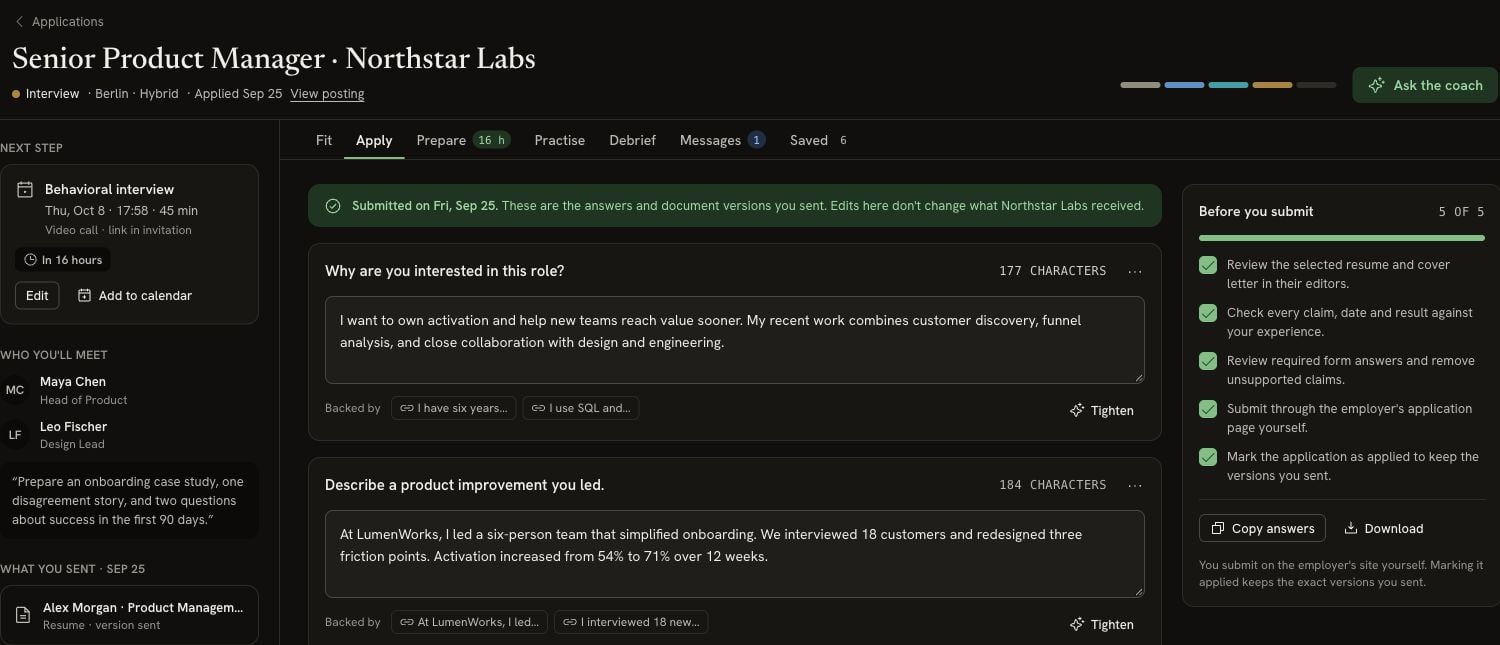 ## Fit a word or character limit
Select the count beside any question to switch all displayed counts between **words** and **characters**. Select it again to switch back. Character counts include spaces.
Choose **Tighten** on an existing answer for a shorter proposal using the same facts. Review it and choose **Accept** or **Skip**. If you need a specific length, put the limit in the question before asking again.
The counter shows your answer's length; it does not block submission or guarantee the employer counts text the same way. Check the final text in the employer's form too.
## Copy or download your answers
**Copy answers** copies the nonempty questions and answers together. **Download** offers **Markdown (.md)** and **Plain text (.txt)**. You can also copy one answer's text directly for a single field.
## Submit and record what you sent
Use **Before you submit** to review the linked resume and letter, check claims, and complete required answers. Make sure the application links to the actual document versions you intend to send. See [Managing an application](/guides/managing-an-application#seeing-what-you-sent).
Submit on the employer's website yourself. Then choose **Mark as applied** in Apply. This keeps a saved copy of your written answers and the linked documents' versions, and moves the application to Applied.
The current answer text, submitted answer copy, document versions and stage change are recorded together. A failed save leaves the application unsubmitted and your draft available to retry.
Marking it applied records your submission; it does not submit a form for you. Later edits in Apply do not change the copy you kept at submission.
## Reopen a past version
Open **Saved**, find **Answers**, and choose **Open in Apply** to read that saved version. It is read-only. Select **Back to current** to return to your editable answers.
For a later interview, the same facts and stories can support your [opening and practice answers](/guides/preparing-for-interview-day).
This documentation is built and hosted on [Mintlify](https://mintlify.com), a developer documentation platform.
## Fit a word or character limit
Select the count beside any question to switch all displayed counts between **words** and **characters**. Select it again to switch back. Character counts include spaces.
Choose **Tighten** on an existing answer for a shorter proposal using the same facts. Review it and choose **Accept** or **Skip**. If you need a specific length, put the limit in the question before asking again.
The counter shows your answer's length; it does not block submission or guarantee the employer counts text the same way. Check the final text in the employer's form too.
## Copy or download your answers
**Copy answers** copies the nonempty questions and answers together. **Download** offers **Markdown (.md)** and **Plain text (.txt)**. You can also copy one answer's text directly for a single field.
## Submit and record what you sent
Use **Before you submit** to review the linked resume and letter, check claims, and complete required answers. Make sure the application links to the actual document versions you intend to send. See [Managing an application](/guides/managing-an-application#seeing-what-you-sent).
Submit on the employer's website yourself. Then choose **Mark as applied** in Apply. This keeps a saved copy of your written answers and the linked documents' versions, and moves the application to Applied.
The current answer text, submitted answer copy, document versions and stage change are recorded together. A failed save leaves the application unsubmitted and your draft available to retry.
Marking it applied records your submission; it does not submit a form for you. Later edits in Apply do not change the copy you kept at submission.
## Reopen a past version
Open **Saved**, find **Answers**, and choose **Open in Apply** to read that saved version. It is read-only. Select **Back to current** to return to your editable answers.
For a later interview, the same facts and stories can support your [opening and practice answers](/guides/preparing-for-interview-day).
This documentation is built and hosted on [Mintlify](https://mintlify.com), a developer documentation platform.