

Before you start
- Connect your client to the MCP server with OAuth or an API key. See Using the MCP server.
- Ask the client to list its Reactive Resume tools. You should see
list_applications,create_application,update_applicationand the other application tools. - For match scores, tailored resumes, drafted letters and job-posting autofill, set up and test a default AI provider in Reactive Resume. See Connecting an AI provider. These tools send your resume and the job description to that provider.
How applications are organized
Every application sits in one stage:saved, applied, screening, interview, offer or closed. Closing an application takes a reason: not-selected, withdrew, accepted-other or no-response. Each application also has a timeline of stage changes, notes and interviews, optional contacts, tags, a follow-up date, a linked resume and letter, and the resume and cover-letter PDFs you sent.
If you’ve added your own stages, such as Take-home assignment or Ghosted, each one has an ID and counts as one of those six. The client reads your stages with api_applications_lanes_get and passes a stage’s ID as laneId to list_applications, create_application, update_application or bulk_update_applications. Moving to a Closed stage with a preset outcome, such as Ghosted, doesn’t need a reason. See Customizing application stages.
These are the same applications you see in the app’s List, Board, Insights and Calendar views. See Tracking job applications.
Review your pipeline first
Start each session by having the client read what’s already there. That gives it valid IDs and stops it from creating duplicates.list_applications (which can filter by stage and tags), read_application and get_application_stats.
Add applications
When you know the details, ask for the application directly. Onlycompany and role are required.
import_applications takes up to 500 rows per call.
Move stages and add notes
update_application for stages, contacts, tags and follow-up dates, and add_application_note for notes. When update_application changes a list such as contacts or tags, the list it sends replaces the old one, so a careful client reads the application first and sends the full list.
When an application with a linked resume reaches Applied or a later stage, Reactive Resume saves that resume, and the linked letter, as a sent version named after the company. You can see later exactly what you sent.
Schedule interviews
screening, technical, behavioral, onsite or other), a start time, a duration (60 minutes if you don’t say), and an optional location and notes. They appear on the application’s timeline and on the Applications calendar. The client uses add_application_interview, update_application_interview and, to cancel, delete_application_timeline_entry. See Scheduling interviews.
Attach what you sent
attach_application_document accepts one resume PDF and one cover-letter PDF per application, up to 10 MiB each. Inline dataBase64 is limited to 3 MiB of encoded text (about 2.25 MiB of file bytes). For a larger PDF, upload it under your account first and supply its owned storagePath instead. Supply exactly one of dataBase64 or storagePath; external URLs and other users’ files cannot be used. See File limits and references.
Attaching a new file replaces the old one. Downloading an attached PDF requires authentication as its owner with read permission; other requests receive a 404 response. Attaching a file never sends it to an employer.
If your client can’t read files from your computer, attach the PDF in the app instead. See Managing an application.
Use AI on an application
These tools need a tested default AI provider. Scoring and tailoring also need a job description and a linked resume on the application. Drafting uses them when they’re there.
Tailoring uses the same copy and assistant owners as the app. It retains
resumeId and name, and returns reviewRequired: true, generationStatus and the conversation. The resume and posting go to your connection’s capable model; private notes, Knowledge and web access stay out. A completed reply may propose edits or ask for missing facts. If generationStatus is interrupted, the unchanged copy remains available: open it and continue any returned conversation instead of repeating the copy operation. A cancelled request may also have created its unchanged copy; check your documents before trying again. Copies inherit the source’s language and tags.
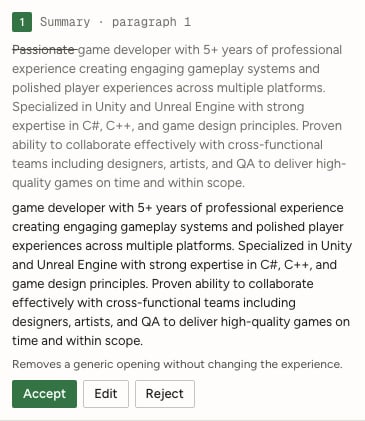
A pending proposal from an API-started fictional tailoring conversation, opened in the existing assistant. The copy remains unchanged until Accept.
tailoredFor), and recording one as accepted on any other resume is refused. Nothing changes until you approve: your AI client applies an approved edit to that copy with apply_resume_patch, passing proposalApplications and proposalSafety, so the decision is recorded in the same write. If the edit’s current wording isn’t what the patch writes, or tailoring doesn’t allow it on that resume, nothing is written. A structural set (an edit with a snapshot) is applied whole. Send snapshot:<edit id> as its proposalApplications value; this bounded receipt identifies the immutable proposal even when its review summary is long. Prose receipts name the current after. Both allow later user refinements in the same save. Older true receipts require the saved content to match the proposal exactly, including the whole snapshot.after for structural sets. A resume with tailored or reworded assistant edits refuses content changes that don’t send proposalSafety. The explicit api_documents_copy_for_job → api_agent_threads_start → api_agent_messages_send route remains available when you want to choose each step.
text in your AI client. Only after you approve it should the client read the new letter’s current revision and call update_cover_letter with the approved body as escaped HTML paragraphs, expectedRevision, and the returned aiOperationIds. Those references retain the original provider/model; saving approved text makes no new model request. The returned coverLetterId does not mean the draft body has been accepted. A failed draft creates no letter. Follow-up mode neither creates a letter nor logs a reply as sent.
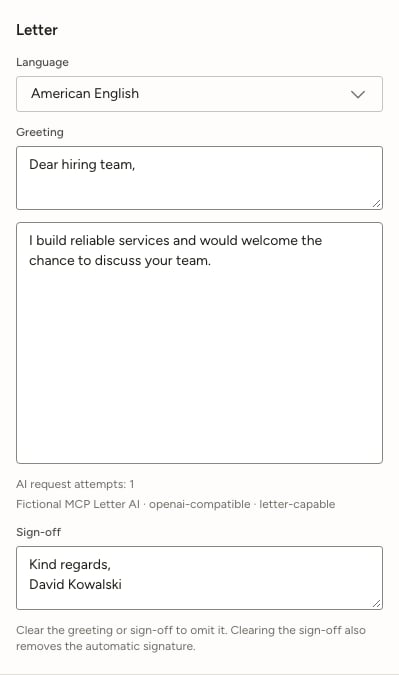
After an explicit approved save, the letter retains its fictional draft connection and model even after that connection is deleted.
Clean up
bulk_update_applications moves up to 200 applications to a stage or adds tags to them. delete_application and bulk_delete_applications delete permanently, including uploaded PDFs that no other application uses; there is no Trash for applications.
Suggested client instructions
Add this to your client’s project or session instructions so it handles your applications carefully:Troubleshooting
Related guides
- Using the MCP server: connecting a client, and the full tool list.
- Tracking job applications: the Applications views in the app.
- Managing an application: the application detail sheet.
matchScore remains a 0–100 compatibility assessment, distinct from the qualitative in-app Fit review; no numeric conversion of Fit is invented. It sends visible resume text rather than private notes or design settings. Results include additive request-source details, saved with the application and retained after connection deletion. A changed application or resume invalidates an in-flight score before it is saved.