Find out whether applicant tracking software can read your resume PDF. Free, no account needed, and the file never leaves your browser.
Browse the free resume template gallery to compare all 18 layouts and download sample PDFs before creating an account.The ATS checker answers one question: can software read your resume? It opens a PDF the way an applicant tracking system (ATS) does, pulls out the text, and shows you what survived and what didn’t. It works with a PDF made in any tool, not only Reactive Resume.The check runs entirely in your browser. The file isn’t uploaded or stored, and you don’t need an account.
The report has the score and issues on the left and your file on the right.
A finished check
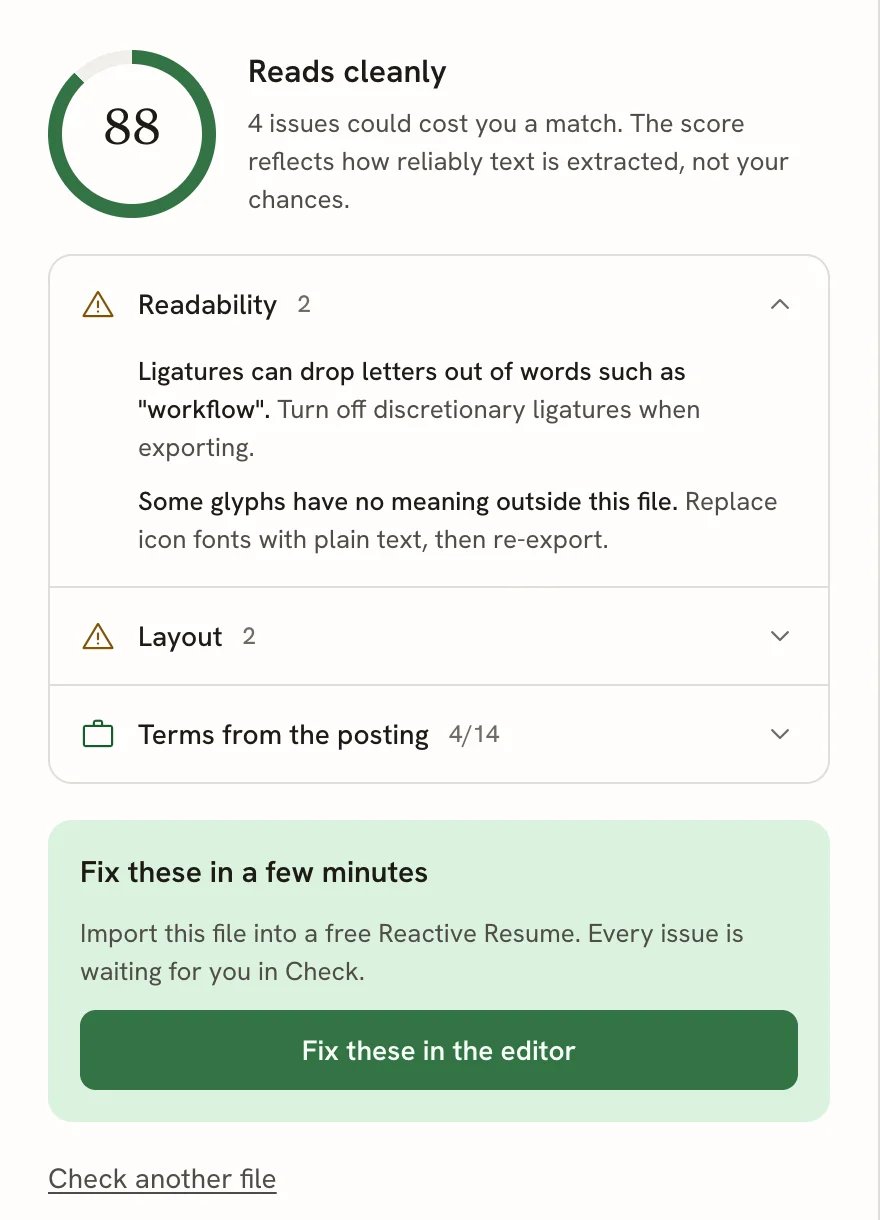
The score. A number from 0 to 100 with a verdict: Reads cleanly (80 and above), Mostly readable (50 to 79) or Hard for software to read (below 50). It combines five categories, and a serious problem (a blocker) caps it: a PDF with no real text can’t score well because its margins are tidy. The score reflects how reliably text comes out of the file, not your chances of getting the job.The issue rows. Each category with something to fix gets a row, worst first. Open a row to see each problem in bold, followed by what to do about it. If you pasted a posting, the last row, Terms from the posting, counts the terms found (for example 4/14) and lists the missing ones.
The score, issue rows and the fix card
The five scored categories are:
Category
What it checks
Readability
Whether software can recover the words at all: a real text layer rather than a picture, fonts that map to letters, no hidden text, encryption or form fields in the way, and a sensible file and page size.
Layout
Whether the page geometry keeps the reading order: columns, tables, lines stored out of order, tight spacing, very small text and narrow margins.
Sections
Whether the resume is split into sections software expects.
Contact details
Whether a recruiter can reach you: name, email, phone and links survive intact.
Dates
Whether your timeline can be reconstructed from the dates.
Writing gives advice for the person reading your resume, such as numbers that show impact, first-person pronouns and long bullets. These tips appear in the results alongside the scored findings and never affect the score.Only the first 30 pages of a long file are checked; the report says so when that happens.
Select Fix these in the editor to import the same file into a free Reactive Resume account. The file is read in your browser, the same way the check read it, and the new resume opens in Check with the issues waiting for you.
If you’re signed in, the import starts straight away.
If you aren’t, you’re taken to create an account first. The file waits in your browser in the meantime and is imported as soon as you’re back, then removed from the browser.
To start over with a different file, select Check another file.
No tool can tell you whether an application will be rejected. That depends on the employer’s system, the screening
questions and the person reading. The checker measures one thing: how faithfully software can extract your file’s
text.
{"docsConfig":{"theme":"mint","$schema":"https://mintlify.com/docs.json","name":"Reactive Resume","description":"A privacy-minded resume builder that is customizable, portable, open-source, and free to use.","colors":{"primary":"#166534","light":"#07C983","dark":"#15803D"},"logo":{"light":"https://mintcdn.com/reactiveresume/lsEa0V8tmq-7Vofb/logo/light.svg?fit=max\u0026auto=format\u0026n=lsEa0V8tmq-7Vofb\u0026q=85\u0026s=21a2f3c9b27509effa871b216e67c0ce","dark":"https://mintcdn.com/reactiveresume/lsEa0V8tmq-7Vofb/logo/dark.svg?fit=max\u0026auto=format\u0026n=lsEa0V8tmq-7Vofb\u0026q=85\u0026s=fe4e07f4f06411b0ad16fd4644a475de","href":"https://rxresu.me"},"favicon":"https://mintcdn.com/reactiveresume/lsEa0V8tmq-7Vofb/favicon.svg?fit=max\u0026auto=format\u0026n=lsEa0V8tmq-7Vofb\u0026q=85\u0026s=6d7f6f71f71340846e94142b357a89b7","background":{"decoration":"grid"},"navbar":{"links":[{"href":"https://rxresu.me/resume-templates","label":"Resume templates"},{"href":"https://github.com/reactive-resume/reactive-resume/issues","label":"Support"}],"primary":{"type":"button","label":"Build your resume","href":"https://rxresu.me/auth/register"}},"footer":{"socials":{"website":"https://rxresu.me","github":"https://github.com/reactive-resume/reactive-resume"}},"seo":{"metatags":{"canonical":"https://docs.rxresu.me","og:image":"https://rxresu.me/opengraph/banner.jpg"},"indexing":"navigable"},"fonts":{"heading":{"family":"IBM Plex Sans"},"body":{"family":"IBM Plex Sans"}},"icons":{"library":"lucide"},"contextual":{"options":["copy","view"],"display":"header"},"styling":{"latex":true},"navigation":{"global":{"anchors":[{"anchor":"Reactive Resume","icon":"link","href":"https://rxresu.me"},{"anchor":"Source Code","icon":"github","href":"https://github.com/reactive-resume/reactive-resume"}]},"pages":[]}},"deployment":{"deploymentMetadataValue":{"subdomain":"reactiveresume","hasAudioNarration":false,"actualSubdomain":"reactiveresume","customDomains":["docs.rxresu.me"],"gitSource":{"type":"github","owner":"reactive-resume","repo":"reactive-resume","deployBranch":"main","contentDirectory":"docs","isPrivate":false,"mountPath":"","label":""},"chroma":{"liveDeploymentHistoryId":"6ae0a23201e51dac894f4532","collectionId":"02daa165-e083-4ec5-9eaa-5061199c000b","schemaVersion":"v3","latestBuiltDeploymentHistoryId":"6ae0a23201e51dac894f4532"},"feedback":{"edits":true,"thumbs":false,"issues":true,"agentFeedback":true},"entitlements":{"AI_CHAT":{"status":"ENABLED"},"WEB_MCP":{"status":"ENABLED"},"NARRATION":{"status":"ENABLED"}},"buildId":"6ae0a23201e51dac894f4532","clientVersion":"0.0.3990","searchFilterCounts":[{"language":"default","tag":"API Reference","count":201},{"language":"default","tag":"Documentation","count":121},{"language":"default","tag":"Applications","count":35},{"language":"default","tag":"Career","count":30},{"language":"default","tag":"Resumes","count":26},{"language":"default","tag":"Documents","count":24},{"language":"default","tag":"Cover Letters","count":24},{"language":"default","tag":"Comparisons","count":17},{"language":"default","tag":"Agent","count":15},{"language":"default","tag":"Integrations","count":13}]},"assistantConfig":{"enableAskAiButton":false,"enableStarterQuestions":true,"enableContextualStarterQuestions":true,"enableAskAiSearchBar":true,"deflection":{"enabled":true,"email":"hello@amruthpillai.com","showHelpButton":true}},"basePath":"","hasChatPermissions":true,"hasWebMcpPermissions":true,"toggles":[{"name":"kill-isr","enabled":true,"variant":{"name":"disabled","enabled":false,"feature_enabled":true},"impressionData":false},{"name":"agent-mintlify-slack","enabled":true,"variant":{"name":"disabled","enabled":false,"feature_enabled":true},"impressionData":false},{"name":"editor-v7-file-tree","enabled":true,"variant":{"name":"disabled","enabled":false,"feature_enabled":true},"impressionData":false},{"name":"agent-integrations-settings","enabled":true,"variant":{"name":"disabled","enabled":false,"feature_enabled":true},"impressionData":false},{"name":"automations-pr-grouping","enabled":true,"variant":{"name":"disabled","enabled":false,"feature_enabled":true},"impressionData":false},{"name":"custom-prefix","enabled":true,"variant":{"name":"disabled","enabled":false,"feature_enabled":true},"impressionData":false},{"name":"analytics-v7","enabled":true,"variant":{"name":"disabled","enabled":false,"feature_enabled":true},"impressionData":false},{"name":"user-flows-analytics","enabled":true,"variant":{"name":"disabled","enabled":false,"feature_enabled":true},"impressionData":false},{"name":"no-publish-flow","enabled":true,"variant":{"name":"disabled","enabled":false,"feature_enabled":true},"impressionData":false},{"name":"workos-onboarding","enabled":true,"variant":{"name":"disabled","enabled":false,"feature_enabled":true},"impressionData":false},{"name":"llms-txt-v2","enabled":true,"variant":{"name":"disabled","enabled":false,"feature_enabled":true},"impressionData":false},{"name":"pause-universal-search-reconcile","enabled":true,"variant":{"name":"disabled","enabled":false,"feature_enabled":true},"impressionData":false},{"name":"snapshot-serving-live","enabled":true,"variant":{"name":"disabled","enabled":false,"feature_enabled":true},"impressionData":false},{"name":"stripTemperatureMiddleware","enabled":true,"variant":{"name":"disabled","enabled":false,"feature_enabled":true},"impressionData":false},{"name":"per-site-search-delta","enabled":true,"variant":{"name":"disabled","enabled":false,"feature_enabled":true},"impressionData":false},{"name":"support-platform-pylon-zendesk","enabled":true,"variant":{"name":"disabled","enabled":false,"feature_enabled":true},"impressionData":false},{"name":"snapshot-serving","enabled":true,"variant":{"name":"disabled","enabled":false,"feature_enabled":true},"impressionData":false},{"name":"instant-rollback","enabled":true,"variant":{"name":"disabled","enabled":false,"feature_enabled":true},"impressionData":false},{"name":"granular-notifications-server","enabled":true,"variant":{"name":"disabled","enabled":false,"feature_enabled":true},"impressionData":false},{"name":"granular-notifications","enabled":true,"variant":{"name":"disabled","enabled":false,"feature_enabled":true},"impressionData":false},{"name":"editor-private-page-search","enabled":true,"variant":{"name":"disabled","enabled":false,"feature_enabled":true},"impressionData":false},{"name":"automations-fable","enabled":true,"variant":{"name":"disabled","enabled":false,"feature_enabled":true},"impressionData":false},{"name":"fixed-ai-action-pricing","enabled":true,"variant":{"name":"disabled","enabled":false,"feature_enabled":true},"impressionData":false},{"name":"automation-resolve-merge-conflict","enabled":true,"variant":{"name":"disabled","enabled":false,"feature_enabled":true},"impressionData":false},{"name":"scoped-publishing","enabled":true,"variant":{"name":"disabled","enabled":false,"feature_enabled":true},"impressionData":false},{"name":"mintql","enabled":true,"variant":{"name":"disabled","enabled":false,"feature_enabled":true},"impressionData":false},{"name":"page-level-analytics","enabled":true,"variant":{"name":"disabled","enabled":false,"feature_enabled":true},"impressionData":false},{"name":"editor-version-history-v2","enabled":true,"variant":{"name":"disabled","enabled":false,"feature_enabled":true},"impressionData":false},{"name":"editor-nav-generations","enabled":true,"variant":{"name":"disabled","enabled":false,"feature_enabled":true},"impressionData":false},{"name":"billing-page-v2","enabled":true,"variant":{"name":"disabled","enabled":false,"feature_enabled":true},"impressionData":false},{"name":"workspace-projects","enabled":true,"variant":{"name":"disabled","enabled":false,"feature_enabled":true},"impressionData":false},{"name":"assistant-v5","enabled":true,"variant":{"name":"disabled","enabled":false,"feature_enabled":true},"impressionData":false},{"name":"byok-sep-25","enabled":true,"variant":{"name":"disabled","enabled":false,"feature_enabled":true},"impressionData":false},{"name":"fork-pr-previews","enabled":true,"variant":{"name":"disabled","enabled":false,"feature_enabled":true},"impressionData":false},{"name":"revalidation-jwt","enabled":true,"variant":{"name":"disabled","enabled":false,"feature_enabled":true},"impressionData":false},{"name":"vite-origin","enabled":true,"variant":{"name":"disabled","enabled":false,"feature_enabled":true},"impressionData":false},{"name":"editor-agent-model-picker","enabled":true,"variant":{"name":"disabled","enabled":false,"feature_enabled":true},"impressionData":false},{"name":"billing-updated-9-15","enabled":true,"variant":{"name":"disabled","enabled":false,"feature_enabled":true},"impressionData":false},{"name":"workos-sso-scim","enabled":true,"variant":{"name":"disabled","enabled":false,"feature_enabled":true},"impressionData":false},{"name":"hobby-abuse-scan","enabled":true,"variant":{"name":"disabled","enabled":false,"feature_enabled":true},"impressionData":false},{"name":"dashboard-inbox","enabled":true,"variant":{"name":"disabled","enabled":false,"feature_enabled":true},"impressionData":false},{"name":"workos-signup","enabled":true,"variant":{"name":"disabled","enabled":false,"feature_enabled":true},"impressionData":false},{"name":"workos-enabled","enabled":true,"variant":{"name":"disabled","enabled":false,"feature_enabled":true},"impressionData":false}],"isAtlas":false,"googleFontsInlined":true},"customCss":[],"page":{"pagePath":"guides/using-the-ats-checker","slug":"/guides/using-the-ats-checker","pageMetadata":{"title":"Checking any resume PDF with the ATS checker","description":"Find out whether applicant tracking software can read your resume PDF. Free, no account needed, and the file never leaves your browser.","href":"/guides/using-the-ats-checker"},"description":{"compiledSource":"\"use strict\";\nconst {jsx: _jsx} = arguments[0];\nconst {useMDXComponents: _provideComponents} = arguments[0];\nfunction _createMdxContent(props) {\n const _components = {\n p: \"p\",\n ..._provideComponents(),\n ...props.components\n };\n return _jsx(_components.p, {\n children: \"Find out whether applicant tracking software can read your resume PDF. Free, no account needed, and the file never leaves your browser.\"\n });\n}\nfunction MDXContent(props = {}) {\n const {wrapper: MDXLayout} = {\n ..._provideComponents(),\n ...props.components\n };\n return MDXLayout ? _jsx(MDXLayout, {\n ...props,\n children: _jsx(_createMdxContent, {\n ...props\n })\n }) : _createMdxContent(props);\n}\nreturn {\n default: MDXContent\n};\n","frontmatter":{},"scope":{}},"pageType":"default","mdx":{"mdxSource":{"compiledSource":"\"use strict\";const{Fragment:_Fragment,jsx:_jsx,jsxs:_jsxs}=arguments[0];const{useMDXComponents:_provideComponents}=arguments[0];function _createMdxContent(props){const _components={a:`a`,code:`code`,li:`li`,p:`p`,strong:`strong`,tbody:`tbody`,td:`td`,th:`th`,thead:`thead`,tr:`tr`,ul:`ul`,..._provideComponents(),...props.components},{Card,CardGroup,Frame,Heading,Note,OptimizedImage,Step,Steps,Table}=_components;if(!Card)_missingMdxReference(`Card`,true);if(!CardGroup)_missingMdxReference(`CardGroup`,true);if(!Frame)_missingMdxReference(`Frame`,true);if(!Heading)_missingMdxReference(`Heading`,true);if(!Note)_missingMdxReference(`Note`,true);if(!OptimizedImage)_missingMdxReference(`OptimizedImage`,true);if(!Step)_missingMdxReference(`Step`,true);if(!Steps)_missingMdxReference(`Steps`,true);if(!Table)_missingMdxReference(`Table`,true);return _jsxs(_Fragment,{children:[_jsxs(_components.p,{children:[_jsx(_components.a,{href:`https://rxresu.me/resume-templates`,children:`Browse the free resume template gallery`}),` to compare all 18 layouts and download sample PDFs before creating an account.`]}),`\n`,_jsx(_components.p,{children:`The ATS checker answers one question: can software read your resume? It opens a PDF the way an applicant tracking system (ATS) does, pulls out the text, and shows you what survived and what didn’t. It works with a PDF made in any tool, not only Reactive Resume.`}),`\n`,_jsx(_components.p,{children:`The check runs entirely in your browser. The file isn’t uploaded or stored, and you don’t need an account.`}),`\n`,_jsx(Heading,{level:`2`,id:`before-you-start`,children:`Before you start`}),`\n`,_jsxs(_components.ul,{children:[`\n`,_jsx(_components.li,{children:`Have your resume as a PDF, up to 25 MB. Password-protected PDFs can’t be checked; save an unprotected copy first.`}),`\n`,_jsx(_components.li,{children:`Optionally, copy the text of a job posting you’re applying for.`}),`\n`]}),`\n`,_jsx(Heading,{level:`2`,id:`check-your-pdf`,children:`Check your PDF`}),`\n`,_jsxs(Steps,{children:[_jsx(Step,{title:`Open the checker`,children:_jsxs(_components.p,{children:[`Go to `,_jsx(_components.a,{href:`https://rxresu.me/ats-checker`,children:`rxresu.me/ats-checker`}),`. If you host Reactive Resume yourself, add `,_jsx(_components.code,{children:`/ats-checker`}),` to your own address.`]})}),_jsx(Step,{title:`Paste a job posting (optional)`,children:_jsxs(_components.p,{children:[`Paste the posting into `,_jsx(_components.strong,{children:`Job posting`}),`. The report then shows which of its terms your resume already has. Do this before you add the file.`]})}),_jsxs(Step,{title:`Add your PDF`,children:[_jsxs(_components.p,{children:[`Drag the file onto the box, or select `,_jsx(_components.strong,{children:`Drop a PDF here or choose a file`}),` to pick it. To see how the checker works first, select `,_jsx(_components.strong,{children:`Check a sample file`}),`.`]}),_jsx(Frame,{caption:`The drop zone and the optional job posting`,children:_jsx(OptimizedImage,{src:`https://mintcdn.com/reactiveresume/rtb73NdrPCUreUAd/images/guides/using-the-ats-checker/drop-zone-and-posting.webp?fit=max\u0026auto=format\u0026n=rtb73NdrPCUreUAd\u0026q=85\u0026s=4978495f95b04be5baecb5fa5a73cd02`,alt:`Drop zone reading Drop a PDF here or choose a file, Up to 25 MB, checked in your browser, never uploaded, with a Check a sample file button and an empty Job posting box below`,\"data-og-width\":`1280`,width:`1280`,\"data-og-height\":`720`,height:`720`,\"data-path\":`images/guides/using-the-ats-checker/drop-zone-and-posting.webp`,\"data-optimize\":`true`,\"data-opv\":`3`,srcset:`https://mintcdn.com/reactiveresume/rtb73NdrPCUreUAd/images/guides/using-the-ats-checker/drop-zone-and-posting.webp?w=280\u0026fit=max\u0026auto=format\u0026n=rtb73NdrPCUreUAd\u0026q=85\u0026s=cd96b2a06311bf9f5978c868e3f17dad 280w, https://mintcdn.com/reactiveresume/rtb73NdrPCUreUAd/images/guides/using-the-ats-checker/drop-zone-and-posting.webp?w=560\u0026fit=max\u0026auto=format\u0026n=rtb73NdrPCUreUAd\u0026q=85\u0026s=c15ff886862cc273d080947b0ccde8f2 560w, https://mintcdn.com/reactiveresume/rtb73NdrPCUreUAd/images/guides/using-the-ats-checker/drop-zone-and-posting.webp?w=840\u0026fit=max\u0026auto=format\u0026n=rtb73NdrPCUreUAd\u0026q=85\u0026s=10d22d1938b292c0873b2e18095f3191 840w, https://mintcdn.com/reactiveresume/rtb73NdrPCUreUAd/images/guides/using-the-ats-checker/drop-zone-and-posting.webp?w=1100\u0026fit=max\u0026auto=format\u0026n=rtb73NdrPCUreUAd\u0026q=85\u0026s=4e8261e3072fa74f11cfad8b58d26c85 1100w, https://mintcdn.com/reactiveresume/rtb73NdrPCUreUAd/images/guides/using-the-ats-checker/drop-zone-and-posting.webp?w=1650\u0026fit=max\u0026auto=format\u0026n=rtb73NdrPCUreUAd\u0026q=85\u0026s=0de17df82394b81650d352c7cd90d4c4 1650w, https://mintcdn.com/reactiveresume/rtb73NdrPCUreUAd/images/guides/using-the-ats-checker/drop-zone-and-posting.webp?w=2500\u0026fit=max\u0026auto=format\u0026n=rtb73NdrPCUreUAd\u0026q=85\u0026s=19da67cfd7ac90f5bab013ee134a3052 2500w`})})]}),_jsx(Step,{title:`Wait for the three steps`,children:_jsxs(_components.p,{children:[`The checker shows its progress: `,_jsx(_components.strong,{children:`Opening the file`}),`, `,_jsx(_components.strong,{children:`Reading the text`}),`, then `,_jsx(_components.strong,{children:`Checking layout and content`}),`. This usually takes a few seconds.`]})})]}),`\n`,_jsx(Heading,{level:`2`,id:`read-the-report`,children:`Read the report`}),`\n`,_jsx(_components.p,{children:`The report has the score and issues on the left and your file on the right.`}),`\n`,_jsx(Frame,{caption:`A finished check`,children:_jsx(OptimizedImage,{src:`https://mintcdn.com/reactiveresume/rtb73NdrPCUreUAd/images/guides/using-the-ats-checker/checker-result.webp?fit=max\u0026auto=format\u0026n=rtb73NdrPCUreUAd\u0026q=85\u0026s=b3bf492178ff4a34605e59168833199a`,alt:`ATS checker results page with a score of 88, Reads cleanly, issue rows for Readability, Layout and Terms from the posting, a Fix these in the editor button, and the sample resume PDF on the right`,\"data-og-width\":`1600`,width:`1600`,\"data-og-height\":`1000`,height:`1000`,\"data-path\":`images/guides/using-the-ats-checker/checker-result.webp`,\"data-optimize\":`true`,\"data-opv\":`3`,srcset:`https://mintcdn.com/reactiveresume/rtb73NdrPCUreUAd/images/guides/using-the-ats-checker/checker-result.webp?w=280\u0026fit=max\u0026auto=format\u0026n=rtb73NdrPCUreUAd\u0026q=85\u0026s=1d8ba60da81b45f0edc99f460c4177d1 280w, https://mintcdn.com/reactiveresume/rtb73NdrPCUreUAd/images/guides/using-the-ats-checker/checker-result.webp?w=560\u0026fit=max\u0026auto=format\u0026n=rtb73NdrPCUreUAd\u0026q=85\u0026s=71d6f71586ed6d8b0d58eff88d72d499 560w, https://mintcdn.com/reactiveresume/rtb73NdrPCUreUAd/images/guides/using-the-ats-checker/checker-result.webp?w=840\u0026fit=max\u0026auto=format\u0026n=rtb73NdrPCUreUAd\u0026q=85\u0026s=c1e44f664dccb977d4a1e717fc2a0a97 840w, https://mintcdn.com/reactiveresume/rtb73NdrPCUreUAd/images/guides/using-the-ats-checker/checker-result.webp?w=1100\u0026fit=max\u0026auto=format\u0026n=rtb73NdrPCUreUAd\u0026q=85\u0026s=0a82b3a5819b07ce366eb50abb14b3fe 1100w, https://mintcdn.com/reactiveresume/rtb73NdrPCUreUAd/images/guides/using-the-ats-checker/checker-result.webp?w=1650\u0026fit=max\u0026auto=format\u0026n=rtb73NdrPCUreUAd\u0026q=85\u0026s=9652dc8454b9f0c7087ae3a4fbc662e9 1650w, https://mintcdn.com/reactiveresume/rtb73NdrPCUreUAd/images/guides/using-the-ats-checker/checker-result.webp?w=2500\u0026fit=max\u0026auto=format\u0026n=rtb73NdrPCUreUAd\u0026q=85\u0026s=ee61ceacb029dfe983d29f01e7017170 2500w`})}),`\n`,_jsxs(_components.p,{children:[_jsx(_components.strong,{children:`The score.`}),` A number from 0 to 100 with a verdict: `,_jsx(_components.strong,{children:`Reads cleanly`}),` (80 and above), `,_jsx(_components.strong,{children:`Mostly readable`}),` (50 to 79) or `,_jsx(_components.strong,{children:`Hard for software to read`}),` (below 50). It combines five categories, and a serious problem (a blocker) caps it: a PDF with no real text can’t score well because its margins are tidy. The score reflects how reliably text comes out of the file, not your chances of getting the job.`]}),`\n`,_jsxs(_components.p,{children:[_jsx(_components.strong,{children:`The issue rows.`}),` Each category with something to fix gets a row, worst first. Open a row to see each problem in bold, followed by what to do about it. If you pasted a posting, the last row, `,_jsx(_components.strong,{children:`Terms from the posting`}),`, counts the terms found (for example 4/14) and lists the missing ones.`]}),`\n`,_jsx(Frame,{caption:`The score, issue rows and the fix card`,children:_jsx(OptimizedImage,{src:`https://mintcdn.com/reactiveresume/rtb73NdrPCUreUAd/images/guides/using-the-ats-checker/report-and-fix.webp?fit=max\u0026auto=format\u0026n=rtb73NdrPCUreUAd\u0026q=85\u0026s=c317e096ee75fd2f500727e745a838e5`,alt:`Score of 88 with the Readability row open, listing a ligature problem and icon-font glyphs with their fixes, then Layout and Terms from the posting rows and the Fix these in a few minutes card`,\"data-og-width\":`880`,width:`880`,\"data-og-height\":`1220`,height:`1220`,\"data-path\":`images/guides/using-the-ats-checker/report-and-fix.webp`,\"data-optimize\":`true`,\"data-opv\":`3`,srcset:`https://mintcdn.com/reactiveresume/rtb73NdrPCUreUAd/images/guides/using-the-ats-checker/report-and-fix.webp?w=280\u0026fit=max\u0026auto=format\u0026n=rtb73NdrPCUreUAd\u0026q=85\u0026s=58bdd7541b00468587af69d579de60c3 280w, https://mintcdn.com/reactiveresume/rtb73NdrPCUreUAd/images/guides/using-the-ats-checker/report-and-fix.webp?w=560\u0026fit=max\u0026auto=format\u0026n=rtb73NdrPCUreUAd\u0026q=85\u0026s=011349d37ba5ac55e910bf15d0fc0c97 560w, https://mintcdn.com/reactiveresume/rtb73NdrPCUreUAd/images/guides/using-the-ats-checker/report-and-fix.webp?w=840\u0026fit=max\u0026auto=format\u0026n=rtb73NdrPCUreUAd\u0026q=85\u0026s=cb132febac2b82e6b9968c297f44ed33 840w, https://mintcdn.com/reactiveresume/rtb73NdrPCUreUAd/images/guides/using-the-ats-checker/report-and-fix.webp?w=1100\u0026fit=max\u0026auto=format\u0026n=rtb73NdrPCUreUAd\u0026q=85\u0026s=a8f1c9caa653d52ca1d378c4713a0909 1100w, https://mintcdn.com/reactiveresume/rtb73NdrPCUreUAd/images/guides/using-the-ats-checker/report-and-fix.webp?w=1650\u0026fit=max\u0026auto=format\u0026n=rtb73NdrPCUreUAd\u0026q=85\u0026s=0c15803e8556e95b94bd67827ab75ed6 1650w, https://mintcdn.com/reactiveresume/rtb73NdrPCUreUAd/images/guides/using-the-ats-checker/report-and-fix.webp?w=2500\u0026fit=max\u0026auto=format\u0026n=rtb73NdrPCUreUAd\u0026q=85\u0026s=5ba9e27eda80ecf2b21a35583cd06991 2500w`})}),`\n`,_jsx(_components.p,{children:`The five scored categories are:`}),`\n`,_jsxs(Table,{children:[_jsx(_components.thead,{children:_jsxs(_components.tr,{children:[_jsx(_components.th,{children:`Category`}),_jsx(_components.th,{children:`What it checks`})]})}),_jsxs(_components.tbody,{children:[_jsxs(_components.tr,{children:[_jsx(_components.td,{children:_jsx(_components.strong,{children:`Readability`})}),_jsx(_components.td,{children:`Whether software can recover the words at all: a real text layer rather than a picture, fonts that map to letters, no hidden text, encryption or form fields in the way, and a sensible file and page size.`})]}),_jsxs(_components.tr,{children:[_jsx(_components.td,{children:_jsx(_components.strong,{children:`Layout`})}),_jsx(_components.td,{children:`Whether the page geometry keeps the reading order: columns, tables, lines stored out of order, tight spacing, very small text and narrow margins.`})]}),_jsxs(_components.tr,{children:[_jsx(_components.td,{children:_jsx(_components.strong,{children:`Sections`})}),_jsx(_components.td,{children:`Whether the resume is split into sections software expects.`})]}),_jsxs(_components.tr,{children:[_jsx(_components.td,{children:_jsx(_components.strong,{children:`Contact details`})}),_jsx(_components.td,{children:`Whether a recruiter can reach you: name, email, phone and links survive intact.`})]}),_jsxs(_components.tr,{children:[_jsx(_components.td,{children:_jsx(_components.strong,{children:`Dates`})}),_jsx(_components.td,{children:`Whether your timeline can be reconstructed from the dates.`})]})]})]}),`\n`,_jsxs(_components.p,{children:[_jsx(_components.strong,{children:`Writing`}),` gives advice for the person reading your resume, such as numbers that show impact, first-person pronouns and long bullets. These tips appear in the results alongside the scored findings and never affect the score.`]}),`\n`,_jsx(_components.p,{children:`Only the first 30 pages of a long file are checked; the report says so when that happens.`}),`\n`,_jsx(Heading,{level:`2`,id:`see-your-file-as-software-reads-it`,children:`See your file as software reads it`}),`\n`,_jsx(_components.p,{children:`Above your file, switch between two views:`}),`\n`,_jsxs(_components.ul,{children:[`\n`,_jsxs(_components.li,{children:[_jsx(_components.strong,{children:`Original page`}),` shows the PDF as a person sees it.`]}),`\n`,_jsxs(_components.li,{children:[_jsx(_components.strong,{children:`As software reads it`}),` shows the plain text a parser extracts, in the order it comes out.`]}),`\n`]}),`\n`,_jsx(_components.p,{children:`Compare the two. Look for a sidebar landing in the middle of your experience, contact details split across lines, or icons turning into empty boxes.`}),`\n`,_jsx(Frame,{caption:`As software reads it: icons from an icon font come out as empty boxes`,children:_jsx(OptimizedImage,{src:`https://mintcdn.com/reactiveresume/rtb73NdrPCUreUAd/images/guides/using-the-ats-checker/as-software-reads-it.webp?fit=max\u0026auto=format\u0026n=rtb73NdrPCUreUAd\u0026q=85\u0026s=a4219649ff11b0dc3c2dde48a1518256`,alt:`Plain text extracted from the sample resume in a monospace font, with empty box characters where the section icons were`,\"data-og-width\":`1268`,width:`1268`,\"data-og-height\":`960`,height:`960`,\"data-path\":`images/guides/using-the-ats-checker/as-software-reads-it.webp`,\"data-optimize\":`true`,\"data-opv\":`3`,srcset:`https://mintcdn.com/reactiveresume/rtb73NdrPCUreUAd/images/guides/using-the-ats-checker/as-software-reads-it.webp?w=280\u0026fit=max\u0026auto=format\u0026n=rtb73NdrPCUreUAd\u0026q=85\u0026s=8d8c17d4c534746bd812a6f2be294d53 280w, https://mintcdn.com/reactiveresume/rtb73NdrPCUreUAd/images/guides/using-the-ats-checker/as-software-reads-it.webp?w=560\u0026fit=max\u0026auto=format\u0026n=rtb73NdrPCUreUAd\u0026q=85\u0026s=9e5144f7b106a7ba44abb11087a068b6 560w, https://mintcdn.com/reactiveresume/rtb73NdrPCUreUAd/images/guides/using-the-ats-checker/as-software-reads-it.webp?w=840\u0026fit=max\u0026auto=format\u0026n=rtb73NdrPCUreUAd\u0026q=85\u0026s=945f3967267f0e554a382d1efd891adb 840w, https://mintcdn.com/reactiveresume/rtb73NdrPCUreUAd/images/guides/using-the-ats-checker/as-software-reads-it.webp?w=1100\u0026fit=max\u0026auto=format\u0026n=rtb73NdrPCUreUAd\u0026q=85\u0026s=f3003c7c61d29d022a822aeddb90632e 1100w, https://mintcdn.com/reactiveresume/rtb73NdrPCUreUAd/images/guides/using-the-ats-checker/as-software-reads-it.webp?w=1650\u0026fit=max\u0026auto=format\u0026n=rtb73NdrPCUreUAd\u0026q=85\u0026s=d5eb26718eb45eba398895115f56112f 1650w, https://mintcdn.com/reactiveresume/rtb73NdrPCUreUAd/images/guides/using-the-ats-checker/as-software-reads-it.webp?w=2500\u0026fit=max\u0026auto=format\u0026n=rtb73NdrPCUreUAd\u0026q=85\u0026s=122043304b8205250f93b24572b621d3 2500w`})}),`\n`,_jsx(Heading,{level:`2`,id:`fix-the-issues-in-reactive-resume`,children:`Fix the issues in Reactive Resume`}),`\n`,_jsxs(_components.p,{children:[`Select `,_jsx(_components.strong,{children:`Fix these in the editor`}),` to import the same file into a free Reactive Resume account. The file is read in your browser, the same way the check read it, and the new resume opens in `,_jsx(_components.strong,{children:`Check`}),` with the issues waiting for you.`]}),`\n`,_jsxs(_components.ul,{children:[`\n`,_jsxs(_components.li,{children:[_jsx(_components.strong,{children:`If you’re signed in,`}),` the import starts straight away.`]}),`\n`,_jsxs(_components.li,{children:[_jsx(_components.strong,{children:`If you aren’t,`}),` you’re taken to create an account first. The file waits in your browser in the meantime and is imported as soon as you’re back, then removed from the browser.`]}),`\n`]}),`\n`,_jsxs(_components.p,{children:[`To start over with a different file, select `,_jsx(_components.strong,{children:`Check another file`}),`.`]}),`\n`,_jsx(Note,{children:_jsx(_components.p,{children:`No tool can tell you whether an application will be rejected. That depends on the employer’s system, the screening\nquestions and the person reading. The checker measures one thing: how faithfully software can extract your file’s\ntext.`})}),`\n`,_jsx(Heading,{level:`2`,id:`related-guides`,children:`Related guides`}),`\n`,_jsxs(CardGroup,{cols:2,children:[_jsx(Card,{title:`Checking your resume before you apply`,href:`/guides/checking-your-resume`,children:_jsx(_components.p,{children:`Check mode in the editor: live checks, job match and a writing review.`})}),_jsx(Card,{title:`Importing resumes`,href:`/guides/importing-resumes`,children:_jsx(_components.p,{children:`Bring an existing resume into Reactive Resume from a PDF, Word or JSON file.`})})]})]})}function MDXContent(props={}){const{wrapper:MDXLayout}={..._provideComponents(),...props.components};return MDXLayout?_jsx(MDXLayout,{...props,children:_jsx(_createMdxContent,{...props})}):_createMdxContent(props)}return{default:MDXContent};function _missingMdxReference(id,component){throw new Error(`Expected `+(component?`component`:`object`)+\" `\"+id+\"` to be defined: you likely forgot to import, pass, or provide it.\")}","frontmatter":{},"scope":{"config":{},"pageMetadata":{"title":"Checking any resume PDF with the ATS checker","description":"Find out whether applicant tracking software can read your resume PDF. Free, no account needed, and the file never leaves your browser.","href":"/guides/using-the-ats-checker"}}},"mdxSourceWithNoJs":null},"mdxExtracts":{"tableOfContents":[{"title":"Before you start","slug":"before-you-start","depth":2,"children":[]},{"title":"Check your PDF","slug":"check-your-pdf","depth":2,"children":[]},{"title":"Read the report","slug":"read-the-report","depth":2,"children":[]},{"title":"See your file as software reads it","slug":"see-your-file-as-software-reads-it","depth":2,"children":[]},{"title":"Fix the issues in Reactive Resume","slug":"fix-the-issues-in-reactive-resume","depth":2,"children":[]},{"title":"Related guides","slug":"related-guides","depth":2,"children":[]}],"codeExamples":{}},"jsLinks":[],"subdomain":"reactiveresume","siteName":"Reactive Resume","title":"Checking any resume PDF with the ATS checker - Reactive Resume","contextualStarterQuestions":[{"_id":"6ad8b137d14bbcf6812dbc04","deploymentId":"696550c78205dc150ed83107","questionText":"How do I check my resume PDF?","status":"active","generatedBy":"contextual","path":"guides/using-the-ats-checker","createdAt":"2026-10-21T12:33:59.580Z","updatedAt":"2026-10-21T12:33:59.580Z","__v":0},{"_id":"6ad8b137d14bbcf6812dbc06","deploymentId":"696550c78205dc150ed83107","questionText":"Can I use password-protected PDFs?","status":"active","generatedBy":"contextual","path":"guides/using-the-ats-checker","createdAt":"2026-10-21T12:33:59.580Z","updatedAt":"2026-10-21T12:33:59.580Z","__v":0},{"_id":"6ad8b137d14bbcf6812dbc05","deploymentId":"696550c78205dc150ed83107","questionText":"What file size limit does it have?","status":"active","generatedBy":"contextual","path":"guides/using-the-ats-checker","createdAt":"2026-10-21T12:33:59.580Z","updatedAt":"2026-10-21T12:33:59.580Z","__v":0}],"navMaps":{"firstHrefInVersion":{},"firstHrefInLanguage":{}},"lastModified":"2026-10-21T12:33:54.296Z","originalFileLocation":"guides/using-the-ats-checker.mdx"},"headHtml":"\u003cscript data-mint-head>(function(){var d=document.documentElement,p=null;if(!p){try{p=localStorage.getItem(\"isDarkMode\")}catch(e){}if(p==='true')p='dark';else if(p==='false')p='light';if(p!=='light'\u0026\u0026p!=='dark'\u0026\u0026p!=='system')p=\"system\"}var r=p==='system'?(matchMedia(\"(prefers-color-scheme: dark)\").matches?'dark':'light'):p;d.classList.remove(r==='dark'?'light':'dark');d.classList.add(r);d.setAttribute(\"data-theme-preference\",p)})();\u003c/script>\u003cmeta data-mint-head name=\"description\" content=\"Find out whether applicant tracking software can read your resume PDF. Free, no account needed, and the file never leaves your browser.\">\u003cmeta data-mint-head name=\"application-name\" content=\"Reactive Resume\">\u003cmeta data-mint-head name=\"generator\" content=\"Mintlify\">\u003clink data-mint-head rel=\"icon\" type=\"image/png\" sizes=\"192x192\" href=\"/mintlify-assets/_mintlify/favicons/reactiveresume/m9TtW-C9R_eefHpI/_generated/favicon/android-chrome-192x192.png\" media=\"(prefers-color-scheme: light)\">\u003clink data-mint-head rel=\"apple-touch-icon\" type=\"image/png\" sizes=\"180x180\" href=\"/mintlify-assets/_mintlify/favicons/reactiveresume/m9TtW-C9R_eefHpI/_generated/favicon/apple-touch-icon.png\">\u003clink data-mint-head rel=\"icon\" type=\"image/png\" sizes=\"16x16\" href=\"/mintlify-assets/_mintlify/favicons/reactiveresume/m9TtW-C9R_eefHpI/_generated/favicon/favicon-16x16.png\" media=\"(prefers-color-scheme: light)\">\u003clink data-mint-head rel=\"icon\" type=\"image/png\" sizes=\"32x32\" href=\"/mintlify-assets/_mintlify/favicons/reactiveresume/m9TtW-C9R_eefHpI/_generated/favicon/favicon-32x32.png\" media=\"(prefers-color-scheme: light)\">\u003clink data-mint-head rel=\"shortcut icon\" type=\"image/x-icon\" href=\"/mintlify-assets/_mintlify/favicons/reactiveresume/m9TtW-C9R_eefHpI/_generated/favicon/favicon.ico\" media=\"(prefers-color-scheme: light)\">\u003clink data-mint-head rel=\"icon\" type=\"image/png\" sizes=\"192x192\" href=\"/mintlify-assets/_mintlify/favicons/reactiveresume/m9TtW-C9R_eefHpI/_generated/favicon-dark/android-chrome-192x192.png\" media=\"(prefers-color-scheme: dark)\">\u003clink data-mint-head rel=\"icon\" type=\"image/png\" sizes=\"16x16\" href=\"/mintlify-assets/_mintlify/favicons/reactiveresume/m9TtW-C9R_eefHpI/_generated/favicon-dark/favicon-16x16.png\" media=\"(prefers-color-scheme: dark)\">\u003clink data-mint-head rel=\"icon\" type=\"image/png\" sizes=\"32x32\" href=\"/mintlify-assets/_mintlify/favicons/reactiveresume/m9TtW-C9R_eefHpI/_generated/favicon-dark/favicon-32x32.png\" media=\"(prefers-color-scheme: dark)\">\u003clink data-mint-head rel=\"shortcut icon\" type=\"image/x-icon\" href=\"/mintlify-assets/_mintlify/favicons/reactiveresume/m9TtW-C9R_eefHpI/_generated/favicon-dark/favicon.ico\" media=\"(prefers-color-scheme: dark)\">\u003cmeta data-mint-head property=\"og:title\" content=\"Checking any resume PDF with the ATS checker - Reactive Resume\">\u003cmeta data-mint-head property=\"og:description\" content=\"Find out whether applicant tracking software can read your resume PDF. Free, no account needed, and the file never leaves your browser.\">\u003cmeta data-mint-head property=\"og:site_name\" content=\"Reactive Resume\">\u003cmeta data-mint-head property=\"og:url\" content=\"https://docs.rxresu.me/guides/using-the-ats-checker\">\u003cmeta data-mint-head property=\"og:type\" content=\"website\">\u003cmeta data-mint-head property=\"og:image\" content=\"https://rxresu.me/opengraph/banner.jpg\">\u003cmeta data-mint-head property=\"og:image:width\" content=\"1200\">\u003cmeta data-mint-head property=\"og:image:height\" content=\"630\">\u003cmeta data-mint-head name=\"twitter:card\" content=\"summary_large_image\">\u003cmeta data-mint-head name=\"twitter:title\" content=\"Checking any resume PDF with the ATS checker - Reactive Resume\">\u003cmeta data-mint-head name=\"twitter:description\" content=\"Find out whether applicant tracking software can read your resume PDF. Free, no account needed, and the file never leaves your browser.\">\u003cmeta data-mint-head name=\"twitter:image\" content=\"https://rxresu.me/opengraph/banner.jpg\">\u003cmeta data-mint-head name=\"twitter:image:width\" content=\"1200\">\u003cmeta data-mint-head name=\"twitter:image:height\" content=\"630\">\u003cmeta data-mint-head name=\"msapplication-config\" content=\"/mintlify-assets/_mintlify/favicons/reactiveresume/m9TtW-C9R_eefHpI/_generated/favicon/browserconfig.xml\">\u003cmeta data-mint-head name=\"apple-mobile-web-app-title\" content=\"Reactive Resume\">\u003cmeta data-mint-head name=\"msapplication-TileColor\" content=\"#166534\">\u003clink data-mint-head rel=\"canonical\" href=\"https://docs.rxresu.me/guides/using-the-ats-checker\">\u003clink data-mint-head rel=\"alternate\" type=\"application/xml\" href=\"/sitemap.xml\">\u003clink data-mint-head rel=\"alternate\" type=\"text/markdown\" href=\"/guides/using-the-ats-checker.md\">\u003cscript data-mint-head type=\"application/ld+json\">{\"@context\":\"https://schema.org\",\"@graph\":[{\"@type\":\"Organization\",\"@id\":\"https://docs.rxresu.me/#organization\",\"name\":\"Reactive Resume\",\"url\":\"https://docs.rxresu.me\",\"logo\":{\"@type\":\"ImageObject\",\"url\":\"https://mintcdn.com/reactiveresume/lsEa0V8tmq-7Vofb/logo/light.svg?fit=max\u0026auto=format\u0026n=lsEa0V8tmq-7Vofb\u0026q=85\u0026s=21a2f3c9b27509effa871b216e67c0ce\"}},{\"@type\":\"WebSite\",\"@id\":\"https://docs.rxresu.me#website\",\"name\":\"Reactive Resume\",\"url\":\"https://docs.rxresu.me\",\"publisher\":{\"@id\":\"https://docs.rxresu.me/#organization\"}},{\"@type\":\"WebPage\",\"@id\":\"https://docs.rxresu.me/guides/using-the-ats-checker#webpage\",\"url\":\"https://docs.rxresu.me/guides/using-the-ats-checker\",\"name\":\"Checking any resume PDF with the ATS checker\",\"description\":\"Find out whether applicant tracking software can read your resume PDF. Free, no account needed, and the file never leaves your browser.\",\"dateModified\":\"2026-10-21T12:33:54.296Z\",\"isPartOf\":{\"@id\":\"https://docs.rxresu.me#website\"},\"breadcrumb\":{\"@id\":\"https://docs.rxresu.me/guides/using-the-ats-checker#breadcrumb\"}},{\"@type\":\"BreadcrumbList\",\"@id\":\"https://docs.rxresu.me/guides/using-the-ats-checker#breadcrumb\",\"itemListElement\":[{\"@type\":\"ListItem\",\"position\":1,\"name\":\"Checking Your Resume\",\"item\":\"https://docs.rxresu.me/guides/checking-your-resume\"},{\"@type\":\"ListItem\",\"position\":2,\"name\":\"Checking any resume PDF with the ATS checker\",\"item\":\"https://docs.rxresu.me/guides/using-the-ats-checker\"}]},{\"@type\":[\"Article\",\"TechArticle\"],\"@id\":\"https://docs.rxresu.me/guides/using-the-ats-checker#article\",\"headline\":\"Checking any resume PDF with the ATS checker\",\"name\":\"Checking any resume PDF with the ATS checker\",\"description\":\"Find out whether applicant tracking software can read your resume PDF. Free, no account needed, and the file never leaves your browser.\",\"url\":\"https://docs.rxresu.me/guides/using-the-ats-checker\",\"mainEntityOfPage\":{\"@id\":\"https://docs.rxresu.me/guides/using-the-ats-checker#webpage\"},\"image\":\"https://rxresu.me/opengraph/banner.jpg\",\"dateModified\":\"2026-10-21T12:33:54.296Z\",\"publisher\":{\"@id\":\"https://docs.rxresu.me/#organization\"},\"isPartOf\":{\"@id\":\"https://docs.rxresu.me#website\"}}]}\u003c/script>\u003cscript data-mint-head type=\"application/ld+json\">{\"@context\":\"https://schema.org\",\"@type\":\"WebSite\",\"name\":\"Reactive Resume\",\"creator\":{\"@type\":\"Organization\",\"name\":\"Mintlify\",\"url\":\"https://mintlify.com\"}}\u003c/script>","siteName":"Reactive Resume","nav":{"global":{"anchors":[{"anchor":"Reactive Resume","icon":"link","href":"https://rxresu.me"},{"anchor":"Source Code","icon":"github","href":"https://github.com/reactive-resume/reactive-resume"}]},"tabs":[{"tab":"Documentation","icon":"book","groups":[{"group":"Getting Started","pages":[{"title":"Introduction","href":"/getting-started"},{"title":"Quickstart","href":"/getting-started/quickstart"},{"title":"Video Guides","icon":"circle-play","href":"/guides/video-guides"},{"title":"What's new in v6","href":"/guides/whats-new-in-v6"},{"title":"Using the command bar","href":"/guides/using-the-command-bar"},{"title":"Keyboard shortcuts","href":"/guides/keyboard-shortcuts"},{"title":"Checking service status","href":"/guides/checking-service-status"},{"title":"Accessing the previous version","href":"/guides/accessing-the-previous-version"}]},{"group":"Account","pages":[{"title":"Creating an account","href":"/guides/creating-an-account"},{"title":"Signing in","href":"/guides/signing-in"},{"title":"Updating your profile","href":"/guides/updating-your-profile"},{"title":"Changing appearance and language","href":"/guides/changing-appearance-and-language"},{"title":"Linking social accounts","href":"/guides/linking-social-accounts"},{"title":"Setting up two-step verification","href":"/guides/setting-up-two-factor-authentication"},{"title":"Setting up passkeys","href":"/guides/setting-up-passkeys"},{"title":"Exporting your data","href":"/guides/exporting-your-data"},{"title":"Deleting your account","href":"/guides/deleting-your-account"}]},{"group":"Documents","pages":[{"title":"Creating your first resume","href":"/guides/creating-your-first-resume"},{"title":"Managing your documents","href":"/guides/managing-documents"},{"title":"Organizing documents with tags","href":"/guides/organizing-with-tags"},{"title":"Using the Trash","href":"/guides/using-the-trash"},{"title":"Importing a resume","href":"/guides/importing-resumes"}]},{"group":"Resume Editor","pages":[{"title":"Getting to know the resume editor","href":"/guides/editor-overview"},{"title":"Filling in your details","href":"/guides/filling-in-your-details"},{"title":"Formatting text","href":"/guides/formatting-text"},{"title":"Managing sections","href":"/guides/managing-sections"},{"title":"Editing entries","href":"/guides/editing-entries"},{"title":"Entering dates","href":"/guides/entering-dates"},{"title":"Undoing changes and version history","href":"/guides/undoing-changes-and-version-history"},{"title":"Using private notes","href":"/guides/using-private-notes"},{"title":"Editing on a phone or tablet","href":"/guides/editing-on-mobile"}]},{"group":"Design","pages":[{"title":"Choosing a template","href":"/guides/choosing-a-template"},{"title":"Customizing typography","href":"/guides/customizing-typography"},{"title":"Choosing colors","href":"/guides/choosing-colors"},{"title":"Choosing paper size, margins and language","href":"/guides/selecting-page-format"},{"title":"Arranging the layout","href":"/guides/arranging-the-layout"},{"title":"Fitting content on a page","href":"/guides/fitting-content-on-a-page"},{"title":"Applying custom styles","href":"/applying-custom-styles"}]},{"group":"Checking Your Resume","pages":[{"title":"Checking your resume before you apply","description":"Use Check mode to see how well software reads your resume, fix issues pinned to their lines, match a job posting and review your wording.","href":"/guides/checking-your-resume"},{"title":"Checking any resume PDF with the ATS checker","href":"/guides/using-the-ats-checker"}]},{"group":"Cover Letters","pages":[{"title":"Writing a cover letter","description":"Create a cover letter as its own document, link it to a resume and a job application, match your resume's design, and download it.","href":"/guides/writing-a-cover-letter"}]},{"group":"Sharing and Exporting","pages":[{"title":"Sharing your resume as a web page","href":"/guides/sharing-your-resume-publicly"},{"title":"Downloading your resume","href":"/guides/exporting-your-resume"},{"title":"Exporting a resume to Markdown","href":"/guides/exporting-resume-to-markdown"}]},{"group":"AI Assistant","pages":[{"title":"Connecting an AI provider","href":"/guides/using-ai"},{"title":"Using the assistant","href":"/guides/using-the-assistant"},{"title":"Assistant tools","href":"/guides/ai-agent-tools"}]},{"group":"Career and Application Workspaces","pages":[{"title":"Your career, in one place","href":"/guides/career-overview"},{"title":"Prepare your first application","href":"/guides/first-career-application"},{"title":"Tell your story once","href":"/guides/building-career-knowledge"},{"title":"Apply when your experience is different","href":"/guides/checking-job-fit"},{"title":"Answer another application form","href":"/guides/writing-application-answers"},{"title":"Get ready for interview day","href":"/guides/preparing-for-interview-day"},{"title":"Find roles while you are busy","href":"/guides/finding-roles-automatically"},{"title":"Reply to a recruiter","href":"/guides/replying-to-recruiters"},{"title":"Choose between two offers","href":"/guides/comparing-job-offers"},{"title":"Career and workspace controls","href":"/guides/career-workspace-reference"}]},{"group":"Application Tracker","pages":[{"title":"Tracking job applications","href":"/guides/tracking-job-applications"},{"title":"Adding an application","href":"/guides/adding-an-application"},{"title":"Managing an application","href":"/guides/managing-an-application"},{"title":"Scheduling interviews","href":"/guides/scheduling-interviews"},{"title":"Tailoring a resume for a job","href":"/guides/tailoring-a-resume-for-a-job"},{"title":"Viewing application insights","href":"/guides/viewing-application-insights"},{"title":"Importing applications from CSV","href":"/guides/importing-applications-from-csv"}]},{"group":"Integrations","pages":[{"title":"Using the API","href":"/guides/using-the-api"},{"title":"Using the patch API","href":"/guides/using-the-patch-api"},{"title":"JSON resume schema","href":"/guides/json-resume-schema"},{"title":"Using the MCP server","href":"/guides/using-the-mcp-server"},{"title":"Using WebMCP","href":"/guides/using-webmcp"},{"title":"Managing applications with MCP","href":"/guides/managing-applications-with-mcp"},{"title":"Using agent skills","href":"/guides/using-agent-skills"},{"title":"Large RPC requests","href":"/guides/large-rpc-requests"}]},{"group":"Use Cases","pages":[{"title":"Free resume builder","href":"/use-cases/free-resume-builder"},{"title":"Open-source resume builder","href":"/use-cases/open-source-resume-builder"},{"title":"Privacy-focused resume builder","href":"/use-cases/privacy-focused-resume-builder"},{"title":"Self-hosted resume builder","href":"/use-cases/self-hosted-resume-builder"},{"title":"API and MCP resume automation","href":"/use-cases/api-mcp-resume-automation"},{"title":"Export and share resumes","href":"/use-cases/export-and-share-resumes"},{"title":"AI resume builder","href":"/use-cases/ai-resume-builder"}]},{"group":"Comparisons","pages":[{"title":"Reactive Resume vs Canva","href":"/comparisons/reactive-resume-vs-canva"},{"title":"Reactive Resume vs Adobe Express","href":"/comparisons/reactive-resume-vs-adobe-express"},{"title":"Reactive Resume vs Overleaf","href":"/comparisons/reactive-resume-vs-overleaf"},{"title":"Reactive Resume vs Resume.com","href":"/comparisons/reactive-resume-vs-resume-com"},{"title":"Reactive Resume vs MyPerfectResume","href":"/comparisons/reactive-resume-vs-myperfectresume"},{"title":"Reactive Resume vs Resume-Now","href":"/comparisons/reactive-resume-vs-resume-now"},{"title":"Reactive Resume vs Resume.io","href":"/comparisons/reactive-resume-vs-resume-io"},{"title":"Reactive Resume vs Zety","href":"/comparisons/reactive-resume-vs-zety"},{"title":"Reactive Resume vs Kickresume","href":"/comparisons/reactive-resume-vs-kickresume"},{"title":"Reactive Resume vs ResumeGemini","href":"/comparisons/reactive-resume-vs-resumegemini"},{"title":"Reactive Resume vs Jobscan","href":"/comparisons/reactive-resume-vs-jobscan"},{"title":"Reactive Resume vs Resumod","href":"/comparisons/reactive-resume-vs-resumod"},{"title":"Reactive Resume vs Rezi","href":"/comparisons/reactive-resume-vs-rezi"},{"title":"Reactive Resume vs CareerCircle","href":"/comparisons/reactive-resume-vs-careercircle"},{"title":"Reactive Resume vs Novorésumé","href":"/comparisons/reactive-resume-vs-novoresume"},{"title":"Reactive Resume vs LiveCareer","href":"/comparisons/reactive-resume-vs-livecareer"},{"title":"Reactive Resume vs Freesumes","href":"/comparisons/reactive-resume-vs-freesumes"}]},{"group":"Self-Hosting","pages":[{"title":"Self-hosting with Docker","href":"/self-hosting/docker"},{"title":"Self-hosting with Kubernetes","href":"/self-hosting/kubernetes"},{"title":"Self-hosting on Vercel","href":"/self-hosting/vercel"},{"title":"Self-hosting on Hostinger","href":"/self-hosting/hostinger"},{"title":"Self-hosting on Cloudflare","href":"/self-hosting/cloudflare"},{"title":"Self-hosting on your NAS","href":"/self-hosting/nas"}]},{"group":"Server Configuration","pages":[{"title":"Environment variables","href":"/self-hosting/environment-variables"},{"title":"Sharing domains","href":"/self-hosting/sharing-domains"},{"title":"Mirror Computer Modern fonts","href":"/self-hosting/fonts"},{"title":"Deployment examples","href":"/self-hosting/examples"},{"title":"Job search and AI","href":"/self-hosting/job-search-and-ai"},{"title":"Single sign-on (SSO)","href":"/self-hosting/sso"}]},{"group":"Upgrade Guides","pages":[{"title":"Migrating from v5","href":"/self-hosting/upgrading-to-v6"},{"title":"Migrating from v4","href":"/self-hosting/migration"}]},{"group":"Contributing","pages":[{"title":"Development setup","href":"/contributing/development"},{"title":"Project architecture","href":"/contributing/architecture"},{"title":"Web access adapters","href":"/contributing/web-access"},{"title":"Career platform rollout","href":"/contributing/career-platform"},{"title":"Contributing translations","href":"/contributing/translations"},{"title":"Deployment checks","href":"/contributing/deployment-checks"}]},{"group":"Community","pages":[{"title":"Sponsors","href":"/community/sponsors"},{"title":"Spotlight","href":"/community/spotlight"}]},{"group":"Legal","pages":[{"title":"License","href":"/legal/license"},{"title":"Privacy Policy","href":"/legal/privacy-policy"},{"title":"Terms of Service","href":"/legal/terms-of-service"}]}]},{"tab":"Changelog","icon":"clock","pages":[{"title":"Changelog","href":"/changelog"}]},{"tab":"API Reference","icon":"code","pages":[{"title":"API Reference","href":"/api-reference/system/get-application-health-and-version"}]}]},"title":"Checking any resume PDF with the ATS checker - Reactive Resume","buildId":"dpl_2oYXwqkEXirXBPk8wV1FtM5USFWi","deploymentId":"dpl_2oYXwqkEXirXBPk8wV1FtM5USFWi","dynamics":["07c022d89b","a74be98ba7"],"chunks":["Frame-BbYRHtLl.js","DynamicMarkdown-DN96a4Ur.js","zoom-image-lightbox-D7yRe3On.js","lightbox-handle-r17bVUz3.js"]}