

Run a fit check
- Save the posting in Applications.
- Add relevant experience in Career → Knowledge, and keep the facts you want used switched on.
- Open the application’s details, select Open workspace, then Fit.
- Read the line explaining what will be sent to your AI connection, then choose Check fit.
Read the evidence, not a score
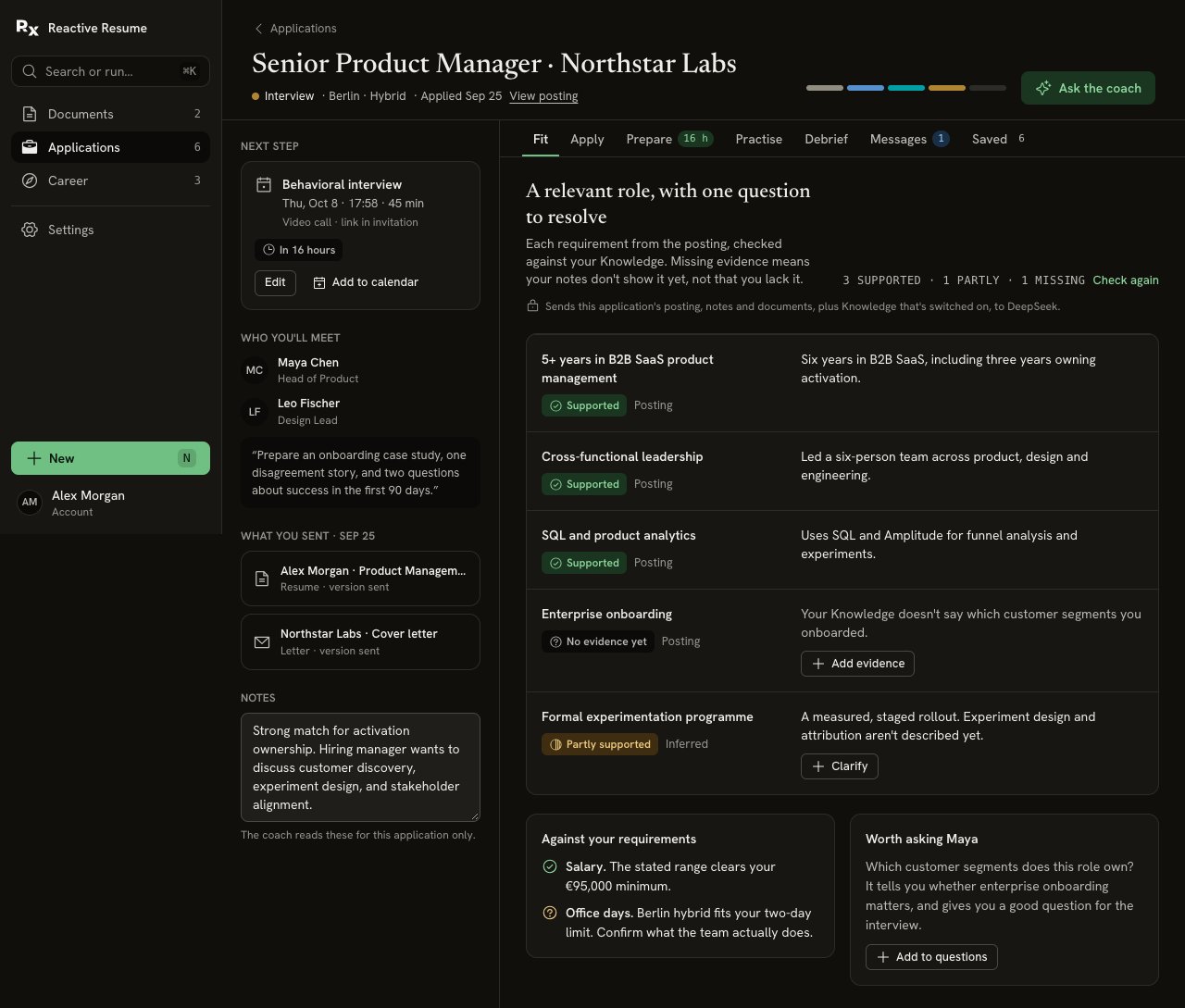
Fit separates supported experience, related evidence and an unanswered requirement. It also distinguishes stated requirements from inferred ones.
There is no fit percentage. Missing evidence is not missing ability, and a supported row is not a promise that you will get an interview.
Add genuine overlap
For the career-switch example, “I interviewed customers about repeated setup problems” might support customer research. It does not establish that you owned a formal research program or worked with enterprise customers. Choose Add evidence or Clarify on a gap. Write the experience you can support and save it. This adds a shared fact to Knowledge, so it can help in other applications too. Use the offered Undo if you added it by mistake. When the underlying context changes, a fresh check may be needed. Choose Check again when offered. Review the new assessment rather than assuming every gap has disappeared.Turn unknowns into questions
Use the suggested question under Worth asking…. Add to questions puts it with the questions for this application in Prepare. Useful questions include:- “Which customer segments would I work with?”
- “Is formal experiment design expected from day one?”
- “How many office days does this team actually work?”