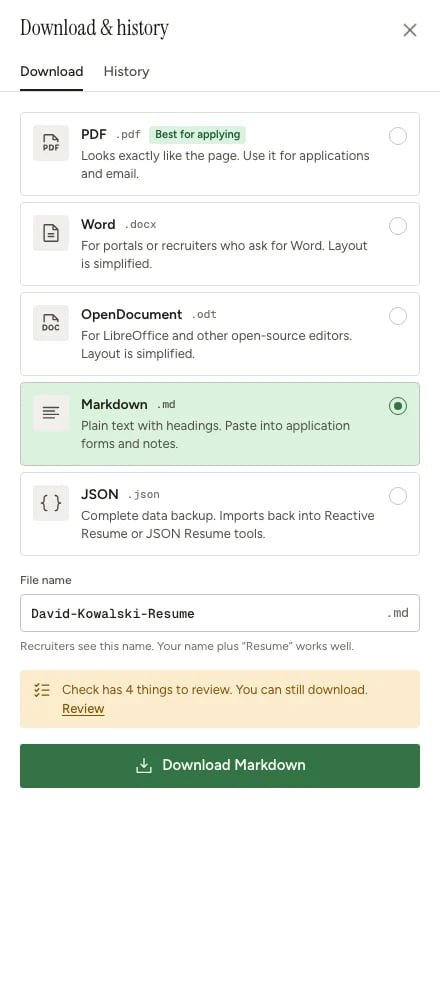
Use Markdown when you want the content of your resume in a portable plain-text format. Markdown keeps headings, lists, links, bold text, and italic text, but it does not try to preserve the visual template, page layout, colors, or spacing from the PDF. Use PDF when you are submitting the finished resume. Use Markdown when you want to reuse, review, transform, or store the resume content.

Export Markdown

1

Open your resume

Go to the dashboard and open the resume you want to export.
2

Open Download

Click Download in the builder header, or open the Export section in the right sidebar and click Download.
3

Choose Resume or Cover letter

Select Resume to export the resume content. Select Cover letter if you want a Markdown copy of the cover letter instead.
4

Download Markdown

In the Markdown row, click Download. Your browser saves a .md file.
Download dialog showing PDF, DOCX, Markdown, and JSON export options for a resume

Use cases

Markdown export is useful when you need readable resume content outside the PDF.
Use caseWhy Markdown helps
AI agents and assistantsMarkdown gives the model structured text with headings and lists, without the layout noise of a PDF.
File search and retrieval systems.md files are easy to index, search, chunk, and cite in retrieval workflows.
GitHub profile or portfolio repositoriesGitHub renders Markdown files, so you can reuse resume content in a profile README or portfolio repo.
Personal websites and static sitesMany site generators and CMS workflows accept Markdown as source content.
Notes and knowledge basesApps like Obsidian use Markdown syntax, so your resume can live next to job-search notes and interview prep.
Version controlMarkdown diffs cleanly, making it easier to review what changed between resume versions.
Quick editingOpen the file in any text editor, make content edits, then copy the text wherever you need it.

Example Markdown

A shortened export of the built-in sample resume looks like this:
# David Kowalski

_Game Developer | Unity & Unreal Engine Specialist_

[email protected] - +1 (555) 291-4756 - Seattle, WA - [davidkowalski.games](https://davidkowalski.games)

## Summary

**Passionate game developer with 5+ years of professional experience** creating engaging gameplay systems and polished player experiences across multiple platforms. Specialized in Unity and Unreal Engine with strong expertise in C#, C++, and game design principles.

## Experience

### Cascade Studios - Senior Game Developer (March 2022 - Present)

_Seattle, WA_

- Lead gameplay programmer on an unannounced AAA action-adventure title built in Unreal Engine 5 for PC and next-gen consoles
- Architected and implemented core combat system including hit detection, combo mechanics, and enemy AI behavior trees serving 15+ enemy types
- Developed custom editor tools in C++ that reduced level designer iteration time by 40% and improved workflow efficiency across the team
- Optimized rendering pipeline and gameplay systems to maintain 60 FPS performance target on all supported platforms

## Education

### University of Washington - Bachelor of Science, Computer Science (2014 - 2018)

_Seattle, WA - Grade: 3.6 GPA_

Concentration in Game Development. Relevant Coursework: Game Engine Architecture, Computer Graphics, Artificial Intelligence, Physics Simulation, 3D Mathematics, Software Engineering, Data Structures & Algorithms

## Skills

### Unity Engine - Expert

C# - Editor Tools - Performance Profiling

### Unreal Engine - Advanced

C++ - Blueprints - UE5 Features

What Markdown includes

Markdown export includes the visible resume or cover-letter content for the selected tab. It keeps the document structure, section headings, item headings, rich-text paragraphs, lists, links, bold text, and italic text. Markdown export does not include visual-only choices such as template design, page size, column layout, colors, icon styling, spacing, or PDF page breaks.
If you are sharing the file with an AI assistant, include the job description in the same prompt and ask for changes as Markdown. That makes the result easy to compare before you update the resume in Reactive Resume.

When not to use Markdown

Do not use Markdown as the final file for most job applications. Applicant portals and recruiters usually expect a PDF or DOCX file. Export Markdown when you need a working copy of the content, then export PDF when you are ready to submit.