A recruiter asks for your availability and a project example. Messages helps you understand the request, draft a reply and update the next step for that job. You paste the message yourself and send the reply from your own email. There is no mailbox connection required.

Read the message

  1. Open the correct application’s workspace and choose Messages.
  2. Paste the employer’s message. Remove unrelated history or private details you do not need to share.
  3. Read the line naming what goes to your AI connection.
  4. Select Read it for me.
A pasted email may include its opening From, To, Date and Subject headers; the reader keeps the current message body and drops those headers and later quoted history. Review the pasted text yourself too. The result identifies what they ask for and what remains unconfirmed. For example, an invitation to “next week” is not a confirmed interview time.
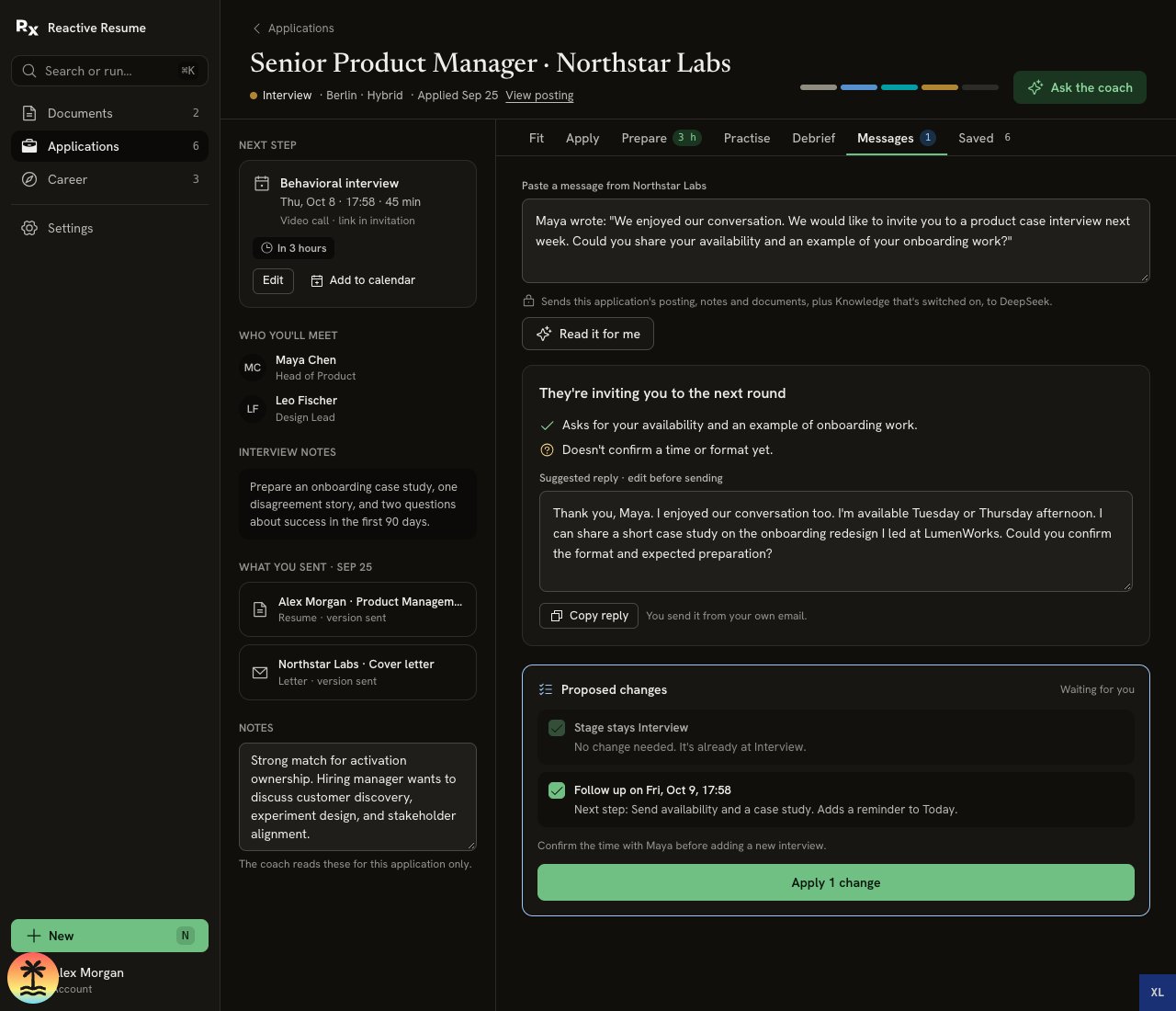
Messages tab with a pasted recruiter invitation, summary, unconfirmed interview time, editable reply and one proposed follow-up change waiting for approval

The invitation asks for availability but leaves the time unconfirmed. The reply and application changes are separate decisions.

Edit and send the reply

Read Suggested reply · edit before sending. Replace suggested availability with times that actually work for you, check any project claims, and adjust the tone. Unfinished messages and edited replies stay in this browser tab through navigation and refresh. Opening a Saved review keeps its original generated reply read-only. Select Copy reply, paste it into your email, review it there and send it yourself. Copying does not send anything. Keep the final wording in your email; do not rely on the reply editor as a sent-email archive.

Choose which application changes to apply

Under Proposed changes, review each selected item:
  • A stage change can reflect an explicit move to the next round.
  • A next step or follow-up can record what you need to do and add a reminder to Today when something is due.
  • Offer terms can be saved for comparison in Career → Offers.
Uncheck any change you do not want, then choose Apply … change(s). A six-second Undo notice lets you cancel the update. A row saying Stage stays Interview needs no change. If the application is still Saved, record its actual submission in Apply → Mark as applied before applying later-stage changes. If the application changed after the review, the app rejects stale proposed changes; read the message again against the current application before retrying. Applying changes updates your records. It does not send the reply, confirm a time with the recruiter or accept an offer.

Record a confirmed interview

When the employer confirms the date, time and format, add the interview through Next step → Edit. Include who you will meet and what to prepare. Then make a preparation plan. For a written or verbal offer, review the proposed terms before saving them, then compare offers.